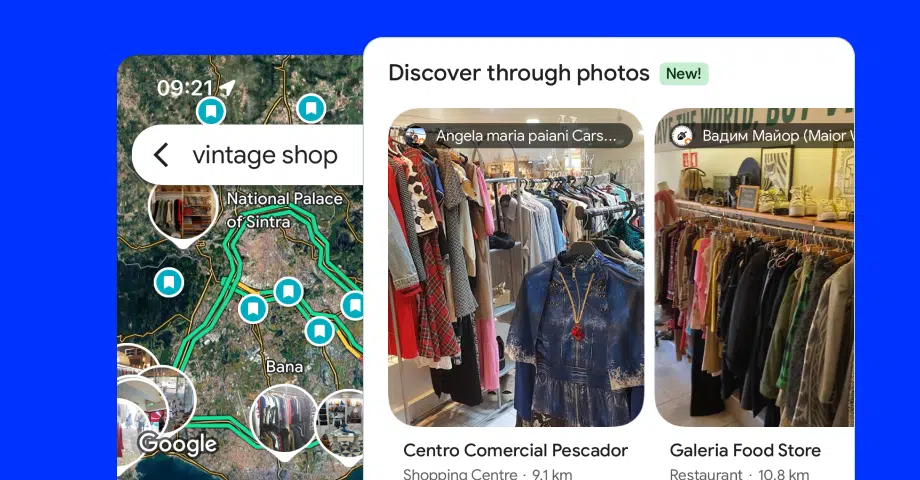

Google Maps just got an exciting feature that transforms the way users search. Called ‘Discover through photos’, this feature allows shoppers to search Google Maps for products, after which they are presented with stores that have them.
This feature is twofold: it has a carousel section with product images connected to specific stores and a unique map with product photos pinned to their locations.
Imagine looking for a product and instantly seeing nearby stores that carry it, this feature isn’t just about convenience; it’s about making your search visual and intuitive.
By blending product photos with location data, Google Maps gives users a faster, more thoughtful way to shop and explore.
What is Google’s ‘Discover through photos’?
Google’s ‘Discover through photos’ is a Google Maps feature that enhances the search experience via images integrated into the search results.
Namely, when users search for specific products or locations, this feature displays a carousel of photos and videos related to the query sourced from public uploads.
This visual approach allows users to better understand products and places before visiting, facilitating more informed decisions and efficient planning.
What’s valuable is this new visual integration directly on the map, users see circular pins with images on the locations that sell the product they are looking for.
That way, users will immediately see the product availability in their vicinity, which will help them decide whether or not to visit specific locations.
In Google’s words:
“Now, you can search in Google Maps for items like pickleball rackets, board games, ice cream makers and more to find nearby stores that have them in stock so you can pick up what you need, stat. No empty stockings here!”
So, whether you’re planning your holiday shopping or just want to check out a café’s menu, Discover Through Photos is the perfect tool.
It’s available now on the Google Maps mobile app, ready to take your searches to the next level. Let me show you how it works and why it’s a game-changer!
Benefits of the new Google Maps visual search feature
Integrating ‘Discover through photos’ into Google Maps was a smart move, as it enhances the user’s shopping journey. After all, UGC impacts the consumer decision-making process, providing the social proof needed to nudge buyers.
Here are the major benefits of this new feature:

- Enhanced decision-making - visual previews of products and locations help users make informed choices, reducing uncertainty;
- Efficient online shopping - quickly identify stores carrying desired items, complete with images, streamlining the shopping process;
- Captivating visual shopping - offers visual UGC that helps users explore products, services, locations, and landmarks when shopping;
- Improved user engagement - engaging visuals capture attention, encouraging users to interact more with the app;
- Time-saving navigation - quickly assess the suitability of a location or product through images, saving time otherwise spent on visits;
- Accessibility enhancement - visual information assists users with specific needs in evaluating the accessibility of locations.
By leveraging these benefits, ‘Discover through photos’ enhances the overall user experience, making Google Maps a more powerful tool for daily activities.
Why should businesses care about Google Maps’ photo search?
The integration of ‘Discover through photos’ enhances the Google Maps marketing strategies you can employ as a business since you boost your visibility with it.
Through tools like Google Merchant Center and product feeds, businesses can have their products appear in Google Search, Google Shopping, and Google Maps.
This expanded presence lets users see product images and availability in nearby stores, facilitating informed purchasing decisions.
For businesses, this means increased exposure to a broader audience actively searching for specific products anywhere on Google.
Read more:
How to optimize your products for ‘Discover through photos’?
To maximize visibility within Google Maps’ ‘Discover Through Photos’ feature, business owners can follow a few sound practices:
- Utilize Google Merchant Center - get started with Merchant Center to upload and manage your product data, ensuring your offerings appear on Google’s surfaces;
- Implement automated feeds - you can also have your products added automatically from your store to your Merchant Center account, thus extracting product information directly from your website, keeping your listings current and comprehensive;
- Maintain accurate product data - regularly update your product details, including availability, pricing, and images, to enhance user engagement and trust.
Following these steps, you can effectively leverage ‘Discover through photos’ to reach a modern audience relying on Google Maps to find what they need.
How to manage the photos on your Google Business Profile
When optimizing your Google Business Profile, collecting (or adding) the right photos and visuals can make a difference in converting visitors to customers.
The new photo management experience includes an easy method to add and remove photos of your business, both taken by you and those of your customers. Plus, it’s super easy to access by tapping ‘Photos’ in your Google Business Profile dashboard:

As you can see, once you access the Google ‘Photos’ section, you can easily add and delete photos, ensuring your profile represents your business accurately:

To make the best impression, always use high-resolution images that meet Google’s photo guidelines, including the format (.jpg or .png) and the size (720 px by 720 px).
Read more:
Remember: avoid adding overly edited or irrelevant visuals so your business appears more authentic and professional. Also, you can request the removal of customer photos if they violate Google Maps’ photo policies and ruin your brand’s image.
At the end of the day, effectively managing your Business Profile photos helps you attract more customers, boost engagement, and create a compelling visual presence for your business on Google Maps.
How to bulk upload photos to multiple Google locations?
Have you added multiple locations to your Google Business Profile for your multi-brand business? There’s a way to upload multiple photos to all of them at once: use a third-party GBP platform with a direct Google API connection like Localith.
In addition to serving as a complete UGC platform, Localith is one of the best GBP tools out there, as it has everything you need to win in local marketing.
With Localith, you can select multiple photos and upload them to more than one location, which is very useful if you are managing a chain-based business.
You only have to connect your Google profiles, where you manage your locations, upload the images, and schedule them for publishing.
Then, you just press a single button, and you are done:

How to use ‘Discover through photos’ on Google Maps?
Accessing this new feature is extremely straightforward as you only have to follow a few simple steps. After all, the feature is activated by default.
Here’s what you have to do:
Step 1: Open Google Maps
Ensure you have the latest version of the Google Maps app installed on your mobile device before logging in and opening it:

Step 2: Conduct a search
Enter the name of the product or service you are looking for in the top search bar. You can also add the relevant location next to it e.g. “Vintage Shop Skopje”:

Step 3: View the results
Now, you should see the map and a card menu below it with shops Google believes fit your criteria along with the ‘Discover through photos’ section at the top:

Step 4: Explore ‘Discover through photos’
You can swipe through the images to better understand the products or places that fit your search criteria. You’ll see multiple portrait cards, each containing a single image, along with the name of the location and the type of business it is:

Step 5: Check out the map
At this point, you can also tap ‘View photo map >’ to access the full map with the circular image pins of every relevant location that meets your criteria:

Step 6: Select a relevant location
Finally, you can select a location you are interested in either by tapping its map marker or pulling up the ‘Photo results’ card from the bottom and finding it there:

Once you select any location, you’ll be welcomed by a familiar screen that lets you check out the photo gallery, get directions, read online reviews, save the place, etc.
At this point, you will have all the information you need to pick the right location for your product. You just have to visit it knowing that they have it in stock.
Google Maps mobile app feature: Insights & use cases
Having personally explored Google Maps’ ‘Discover Through Photos’ feature, I’ve identified several practical applications that enhance daily activities.
1. Streamlined product searches
I tried searching for a specific item, such as a “dining table”, and the feature displayed images of dining tables, which were pinned on the map:

This visual context allowed me to do quick comparisons between the products on offer, thus helping me make a quick purchasing decision.
2. Exploring food and drink options
After shopping, I had a craving for a nice cup of hot Irish coffee, so I used the same feature again, after which I got photos both of the menu item and the café interiors:

This insight into ambiance and offerings helped me select a venue that matched my preferences, allowing me to make a choice that aligned with my expectations.
3. Planning travel itineraries
Then, while having my coffee, I thought I’d visit a nearby museum that exhibits modern art since it’s my favorite. Luckily, ‘Discover through photos’ also showed me that:

This feature was perfect for this exact query since I could look at the art creations that capture my imagination and decide on the spot whether or not to see them in person.
Conclusion: Google Maps now offers a visual shopping experience!
With the launch of ‘Discover through photos’, the new Google Maps product availability feature, Google has revolutionized the way we search for products and plan our activities.
After all, this feature blends product images with location data showcased directly on the map, thus offering a more intuitive and visually engaging experience.
So, whether you’re shopping, dining, or planning a trip, the seamless integration of Google Maps location images on the map makes the process much faster.
Try it out to see just how impactful this feature can be in simplifying decisions and enhancing your daily life. Open Google Maps and start discovering today!
And in case you manage multiple locations and need to bulk upload lots of photos, check EmbedSocal’s GBP software or schedule a demo.






![11 Best Social Media Widgets for Websites [+Top Use Cases]](https://embedsocial.com/wp-content/uploads/2023/03/Social-Media-Carousel-widget-template.webp)