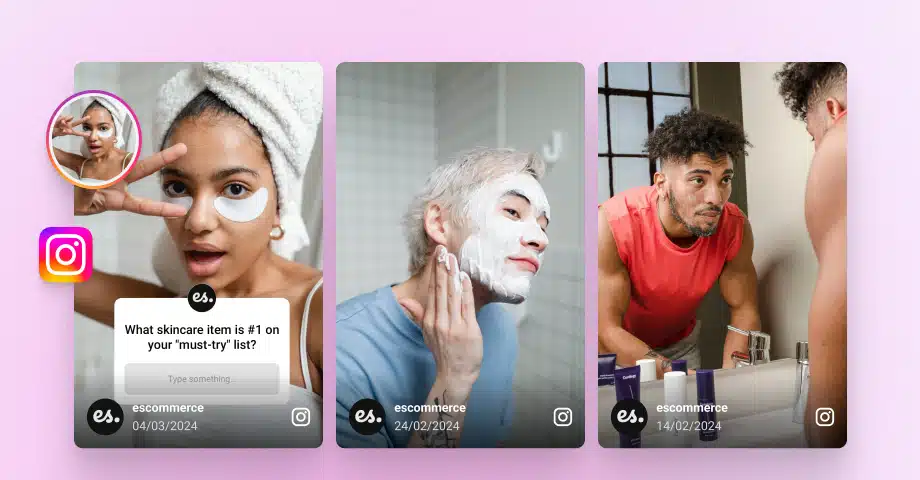
Embedding Instagram stories on websites is getting more popular these days since it’s a great way for brands to keep their website fresh and engage their visitors.
Plus, you can easily lead your Instagram followers to your website via link-in-bio apps or by simply adding your website link to your posts via a link sticker.
To add this Instagram content to your website, you need to use an Instagram website widget, which can be fully customized to your liking and updates automatically.
I’ll tell you all about that process in the sections below and why you need to do it as soon as possible. Plus, you’ll find the best tools and examples for it.
Quick guide: Embed Instagram stories on your website in a few steps
Embedding Instagram stories on website pages is very simple with the right tools. For instance, when using EmbedSocial, you only have a few steps to follow:
- Sign up for an Instagram story widget and a full UGC platform.
- Go to ‘Sources’ → ‘Manage accounts’ and press ‘Add new account’.
- Tap ‘Add Instagram account’ and approve EmbedSocial’s connection to your Instagram.
- Go back to ‘Sources’ → ‘Add new source’ and tap ‘Instagram’.
- Choose @Stories as your source and pick your IG account from the list.
- Tap ‘Create widget’, select your widget template, and design your widget.
- Copy the widget code from the ‘Embed’ tab and paste it onto your website.
If you’re still unsure what to do, check out this interactive video of the process:
That’s all you had to do, and when you’re done, you’ll get something like this:
The above widget also includes our shoppable UGC functionality, which helps your customers immediately navigate to your product pages to shop the look.
However, before you proceed, there are a few things to keep in mind for a successful Instagram story embed, which I outline below, and then you’ll also get the full guide.
What to know when you embed stories on Instagram?
Before you embed Instagram stories on your website, understand that Instagram’s API requires that your Instagram account be a Business or Creator account.
Having a professional Instagram account is necessary to authorize any third-party app, like EmbedSocial, to access and display your stories.
Also, only active (live) stories from the last 24 hours can be pulled from Instagram. Archived and highlighted stories are not available via the API.
Lastly, once the connection is established, the system automatically fetches and updates your latest stories as long as they remain live on Instagram.
Note: Unlike some competitors, EmbedSocial can connect directly to your professional Instagram account without going through your Facebook page first. That said, you must already be logged into your Instagram account on desktop.
Full guide: How to embed Instagram Stories on website step by step
Here are the detailed steps to create an immersive Instagram stories widget, customize it, generate its embeddable code, and embed it on your website:
Step 1: Sign up for the EmbedSocial UGC platform
Before you do anything, you need an EmbedSocial account. Don’t worry, we also offer a 7-day free trial so you can check out all our features before you commit.
Step 2: Add your Instagram account
Next, you have to navigate to ‘Sources’ and tap ‘Add new account’:
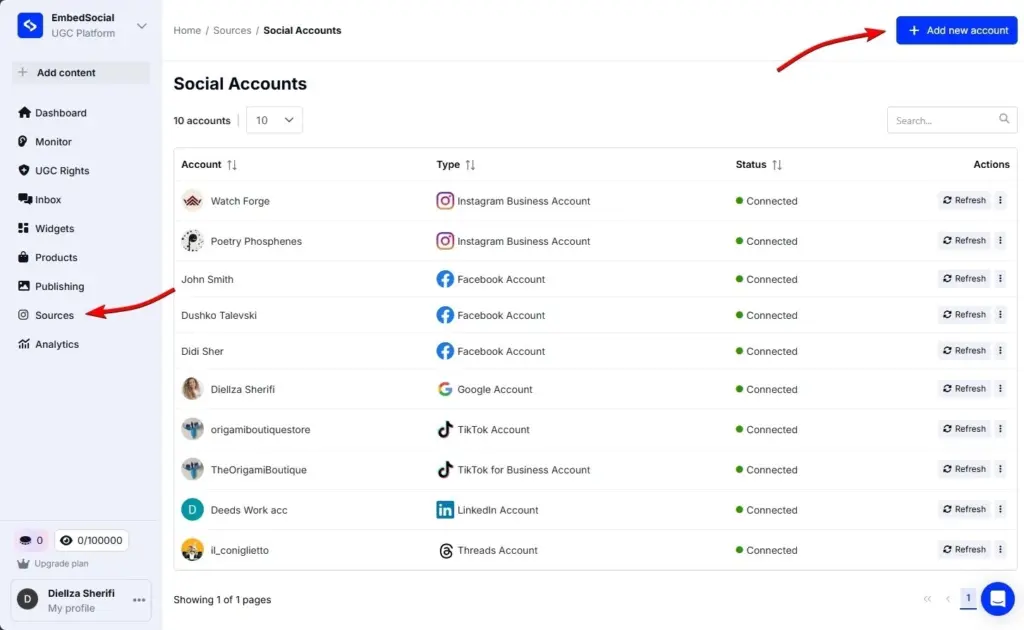
Step 3: Approve the EmbedSocial connection to your Instagram
Once you do that, you have to tap ‘Add Instagram account’ and approve the connection:
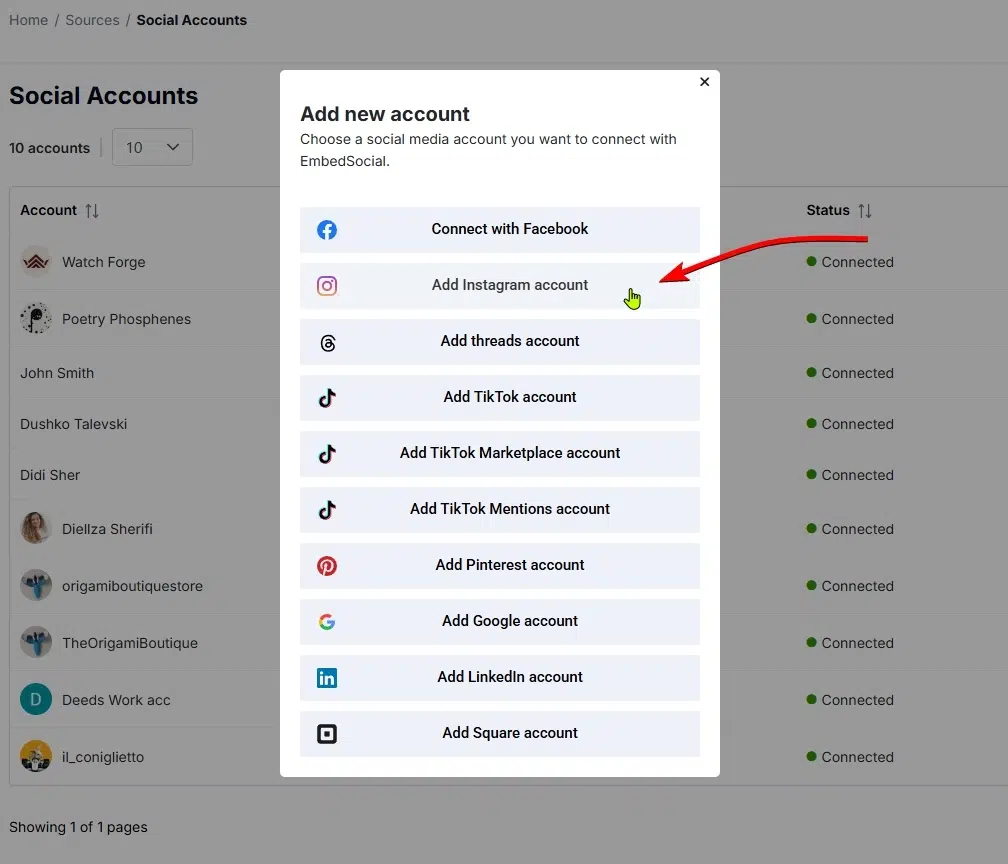
Step 4: Add Instagram as a source in EmbedSocial
Now that Instagram is connected, it’s time to add a specific Instagram source, which you can do via ‘Sources’ → ‘Add new source’ and pressing ‘Instagram’:
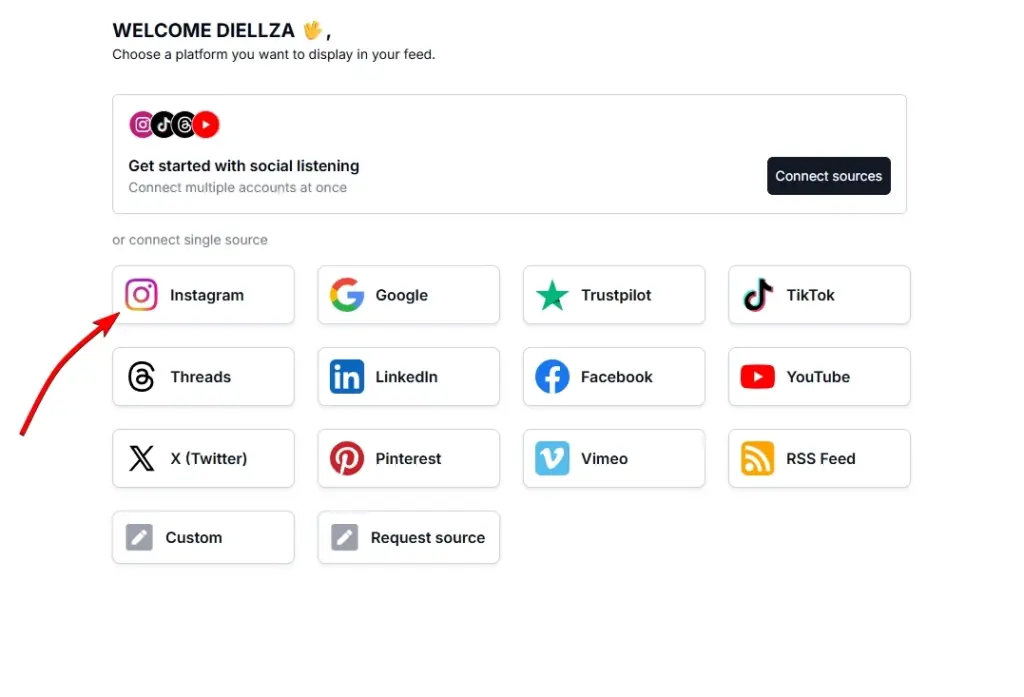
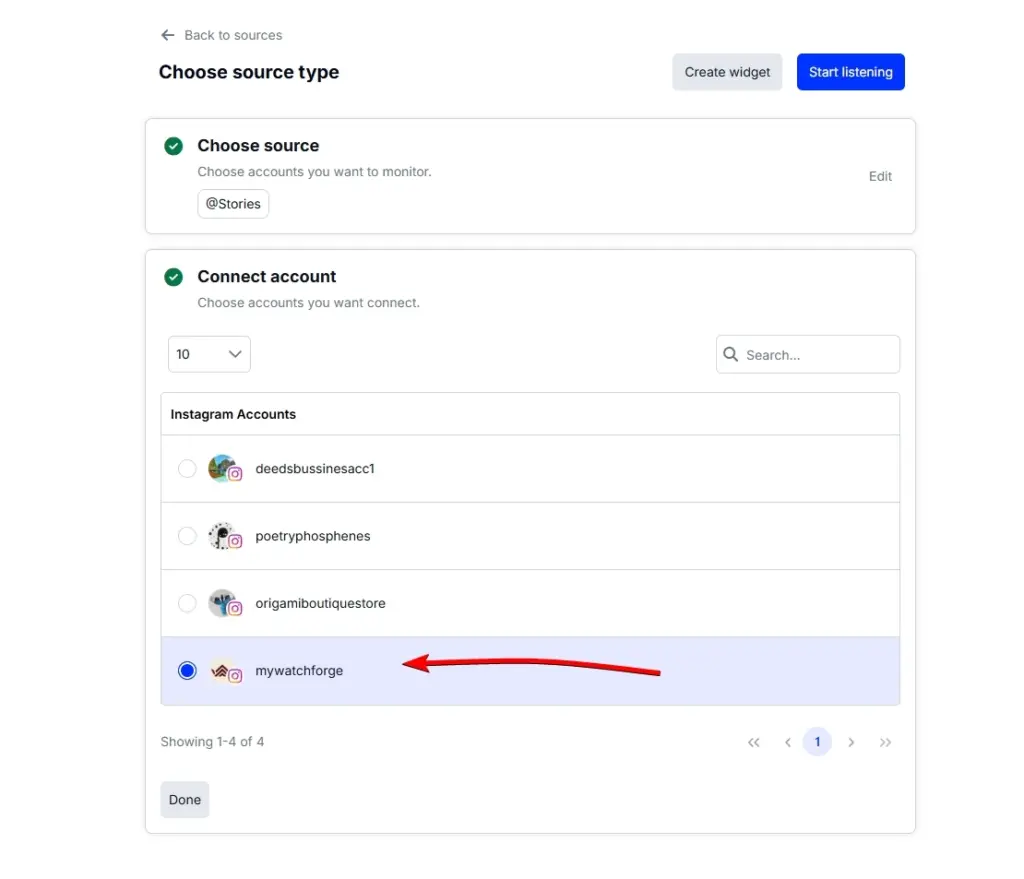
Step 5: Choose @Stories as a source and choose your account
You will have to tap @Stories at this point and then select your connected IG account:
Step 6: Create and design your widget
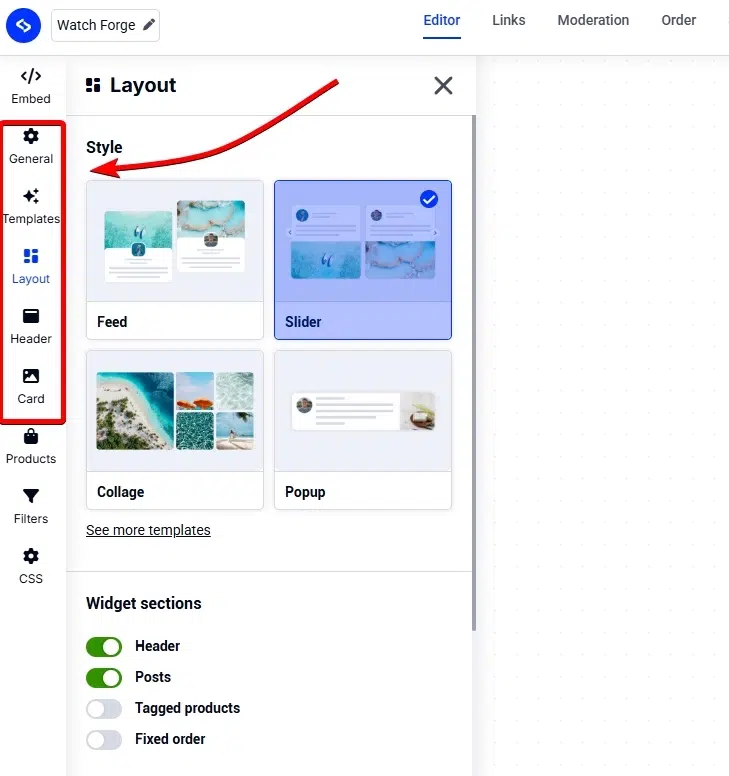
Once you tap ‘Create widget’, you’ll be asked to choose a widget template and taken to the EmbedSocial widget editor. A popular choice for stories is the Instagram Stories Autoplay Slider template.
There, you can change every little thing about your widget’s appearance, from layout to colors, fonts, and the elements your widget will include:
Step 7: Copy and paste the widget code on your website
Lastly, you just need to copy the embeddable widget code, which you can find in the Editor’s ‘Embed’ tab (top-left corner. Once there, click ‘Copy code’:
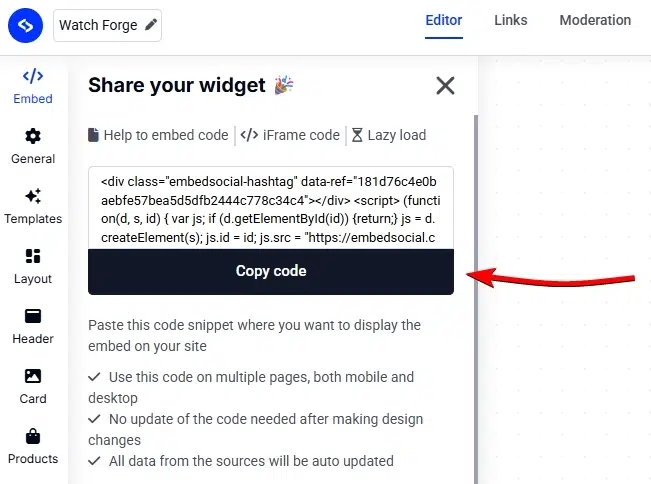
Naturally, the last step is to paste that code on your website. Below, I cover the process of doing that across all popular website builders and CMS platforms.
Video guide: How to embed an Instagram story widget easily
If you’d rather watch a video about how to embed Instagram feeds, here’s one:
How to add an Instagram wall to your website via different CMS platforms?
The process of pasting your Instagram story widget code is similar across all popular website builders. Here’s how to display Instagram posts across most of them:
Why display Instagram Stories on your website?
When you add an Instagram wall to your website that includes Stories, posts, videos, etc., you boost your user engagement and reap additional benefits:
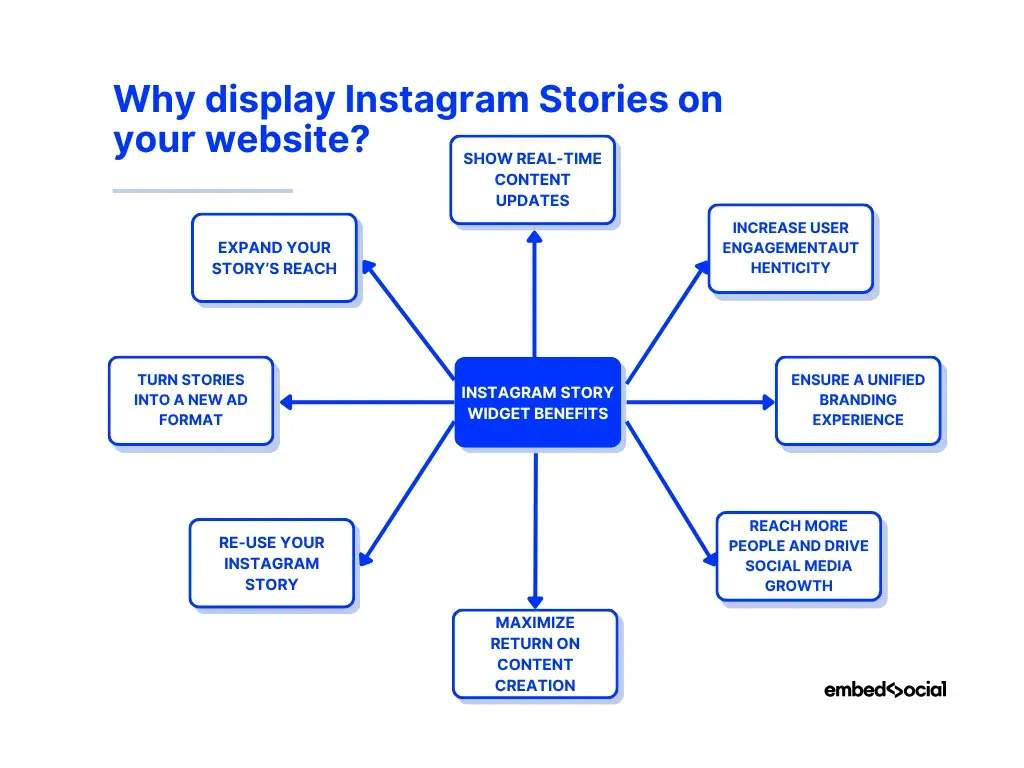
- Show real-time content updates, keep your website lively with automatic story syncs that display your latest events, launches, or behind-the-scenes moments;
- Increase user engagement, bring the familiar story format to your website to captivate visitors with interactive stickers, visuals, and short-form storytelling;
- Ensure a unified branding experience, extend your Instagram aesthetic and tone to your website, creating a seamless experience across both platforms;
- Reach more people and drive social media growth, turn website visitors into Instagram followers by promoting your active story feed on your site;
- Maximize return on content creation, give your stories a longer life by showcasing them beyond Instagram’s 24-hour limit and ensuring more people see them;
- Re-use your Instagram story, repurpose your best stories directly on your site using a professional widget that helps you manage and display them;
- Turn stories into a new ad format, use your embedded stories like digital banners to highlight campaigns or feature promotions across partner sites and web portals;
- Expand your story’s reach, display stories to audiences who may not follow you on Instagram, unlocking new exposure opportunities and driving engagement;
You showcase more than just your content when you embed Instagram posts or stories on your website. You connect your social storytelling with your brand’s digital presence, driving consistent engagement across every channel you own.
Note: You can display all story formats in one widget, photo stories, video stories, and even combine them with a Pinterest Pin stories feed into a single interactive widget.
Why use EmbedSocial to add Instagram story widgets to your website?
If you want to make embedding Instagram stories effortless, automated, and fully customizable, you need a platform like EmbedSocial that optimizes your workflow:

Here’s why it’s the preferred solution for brands and creators:
- Official Instagram API connection, EmbedSocial connects directly to Instagram’s official API, ensuring your stories are always fetched in real time;
- Automatic story updates, new stories sync automatically every 24 hours, keeping your website content fresh without manual uploads;
- Customizable widgets, adjust layout, size, colors, and fonts to perfectly match your website design and brand identity;
- Responsive design, widgets look great on all devices, automatically adapting to desktop, tablet, and mobile screens;
- Multiple display options, choose between popups, sliders, carousels, or grids to showcase your stories in different styles;
- All-in-one content hub, combine stories from multiple Instagram accounts or mix photo, video, and other story formats in a single Instagram feed;
- Cross-platform compatibility, works seamlessly with popular website builders like WordPress, Shopify, Wix, and Squarespace;
- Advanced analytics, track story views and engagement metrics directly from your EmbedSocial dashboard to measure performance.
As you can see, with EmbedSocial, embedding an Instagram stories feed is a one-time setup with several benefits: saving time, improving design, and increasing engagement.
Plus, you can create and add an Instagram wall to your website that contains more than your Stories. You can combine them with Reels and posts as well.
Instagram Story widget examples
EmbedSocial offers several ready-to-go Instagram Story widget templates that you can fully adapt for your needs. Or, you can even create a new template from scratch.
Here are some of the Instagram story embed widgets we offer:
Conclusion: Maximize your Instagram stories’ reach beyond 24 hours!
Embedding Instagram stories on your website helps you extend their visibility and keep your audience engaged even after they disappear from the app.
When you connect your social presence with your website in this manner, you give visitors fresh, dynamic content to explore that updates on its own.
That is, if you sign up for a platform like EmbedSocial that automatically syncs, customizes, and displays your stories anywhere online without any coding.
So, if you’re looking to save time and get more value from every story you create on your Instagram account, embed Instagram stories widget on your website.
Expand the reach of your Instagram stories today with EmbedSocial!





![11 Best Social Media Widgets for Websites [+Top Use Cases]](https://embedsocial.com/wp-content/uploads/2023/03/Social-Media-Carousel-widget-template.webp)
![How to Embed Testimonials on Website in 2026 [2 Methods + Tips]](https://embedsocial.com/wp-content/uploads/2022/11/testimonials-dark-single-slider.jpg.webp)