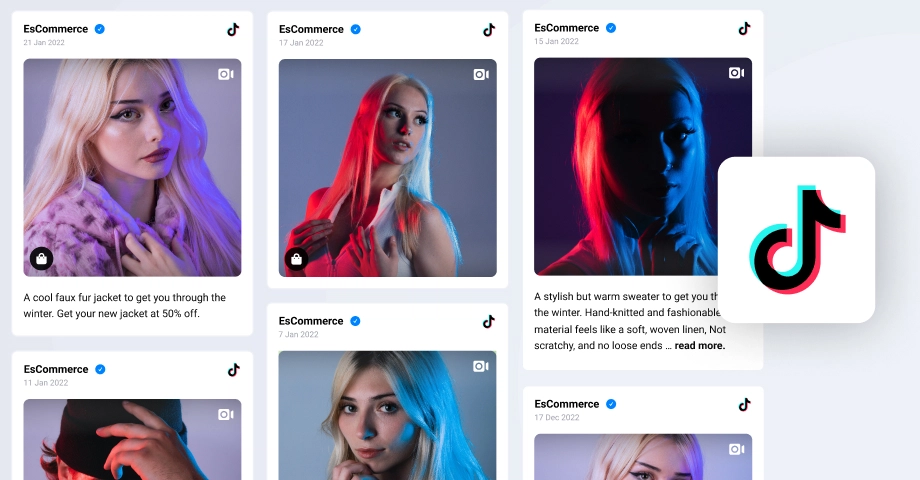
TikTok is becoming increasingly popular, despite its recent regulatory issues, and every brand and business out there should be taking advantage of it.
So, I decided to show you how to embed TikTok videos on any website builder to make the most of this platform and boost your brand’s bottom line.
Below, you’ll learn how to make TikTok part of your UGC strategy by including your TikTok videos and TikTok mentions on your website to engage your visitors.
First, here’s a brief interactive video explaining the process:
Full guide: How to embed a TikTok feed on website via EmbedSocial?
The best option for embedding TikTok videos, TikTok mentions, and all other content types is to use a dedicated third-party tool designed for that purpose.
One such option is EmbedSocial, since it has a direct API connection to TikTok, which allows it to showcase any type of TikTok UGC via the official method.
After creating your EmbedSocial account, using EmbedSocial to create your TikTok UGC widget is very straightforward. Just follow these steps:
- Describe your widget with vibe coding
- Connect your TikTok source
- Choose a TikTok widget template
- Further customize your AI widget
- Copy your AI widget code
- Paste the code on your website
Step 1: Describe your widget with vibe coding
Start by defining what you want your widget to look like. The AI vibe-coding tool takes natural language descriptions to build a starting point for your social wall:

Step 2: Connect your TikTok source
Once the layout is generated, you need to pull in your actual content. Click the connection link to link your TikTok profile to the platform (top of the editor):

To connect your TikTok account to EmbedSocial, you will be prompted to provide the required permissions (the first time), and then you can choose the account you are interested in:

Step 3: Choose a TikTok widget template
Next, you should choose one of our ready-to-go widget templates. Just select the platform in question, as we have designed specific templates for all the different social platforms:
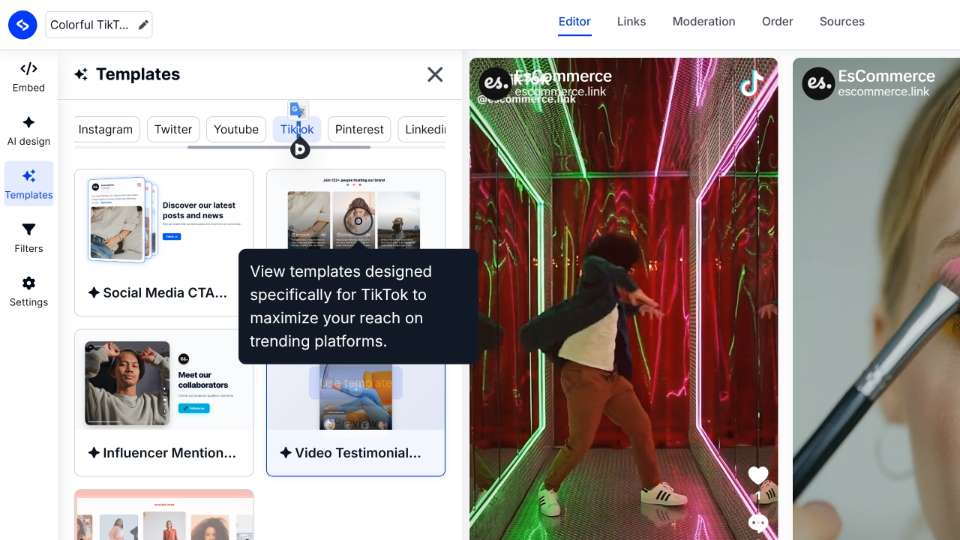
Step 4: Further customize your AI widget
If you aren’t fully on board with your widget look, you can keep prompting the AI widget editor to customize the widget’s look, such as changing its colors, adding extra elements, and more:

Step 5: Copy your AI widget code
Before going back to your webpage, you have to navigate to the ‘Embed’ tab and press ‘Copy code’. That’s it! No coding skills required, as you only need the JavaScript code in most cases:

Step 6: Paste the code on your website
Finally, you only have to navigate to your website builder of choice, place an empty HTML box, container, element, etc., and then just paste the widget code.
Note: The widget will update automatically whenever you receive new content on your social media platforms, so you will have a fresh-looking website constantly.
Video guide: Embed a TikTok feed on your website in seconds
TL;DR: Watch this brief video guide on embedding a TikTok video feed on a website:
How to add a TikTok feed to different website builders?
Adding a TikTok post feed to your website depends on the builder you use, but the process is simple and only takes a few clicks with the right embed code or widget:
Official method: Embed a TikTok video widget on your website via the native option
As it turns out, TikTok also allows users to create embeddable widgets themselves using the platform’s native tools. However, they do come with serious limitations:
- You cannot change the widget’s template
- You cannot customize the title, subtitle, and CTAs
- You cannot change the widget’s color scheme
That said, if you still want to use the native option, this is what to do:
Step 1: Access the official TikTok Embeds page
TikTok offers a solution for showcasing its content. Just follow this link to the TikTok Embeds page, where you can preview your embeds and copy the TikTok embed link:
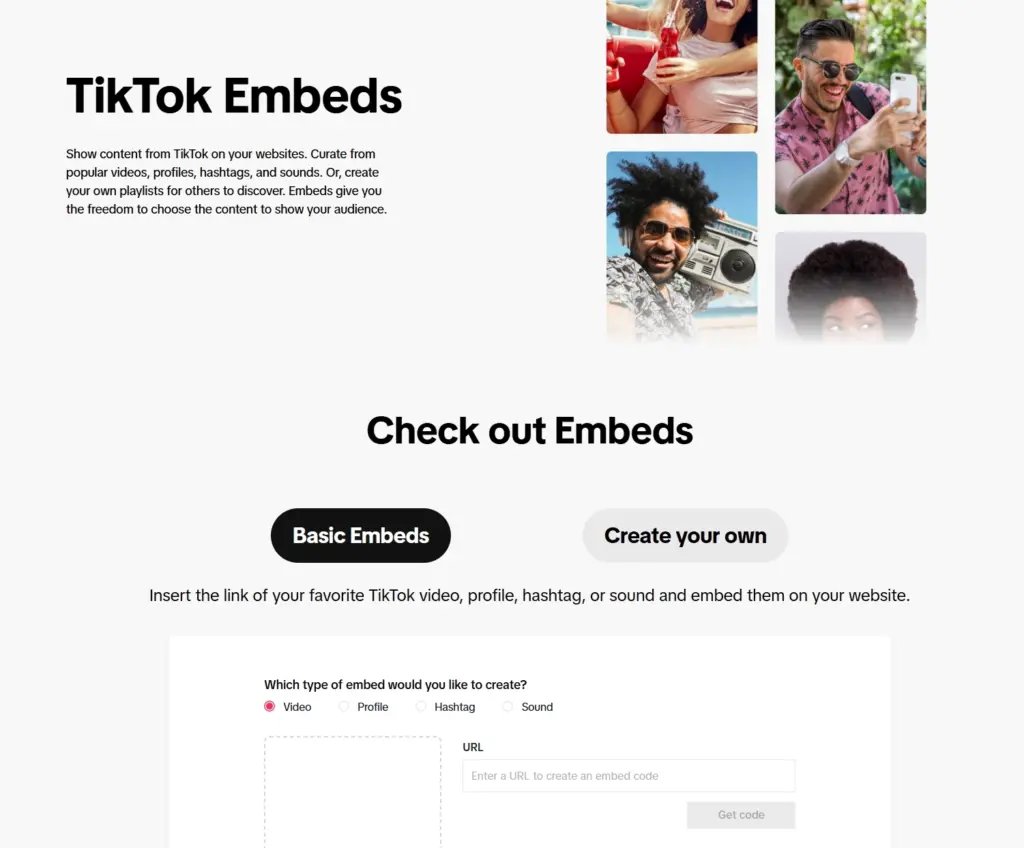
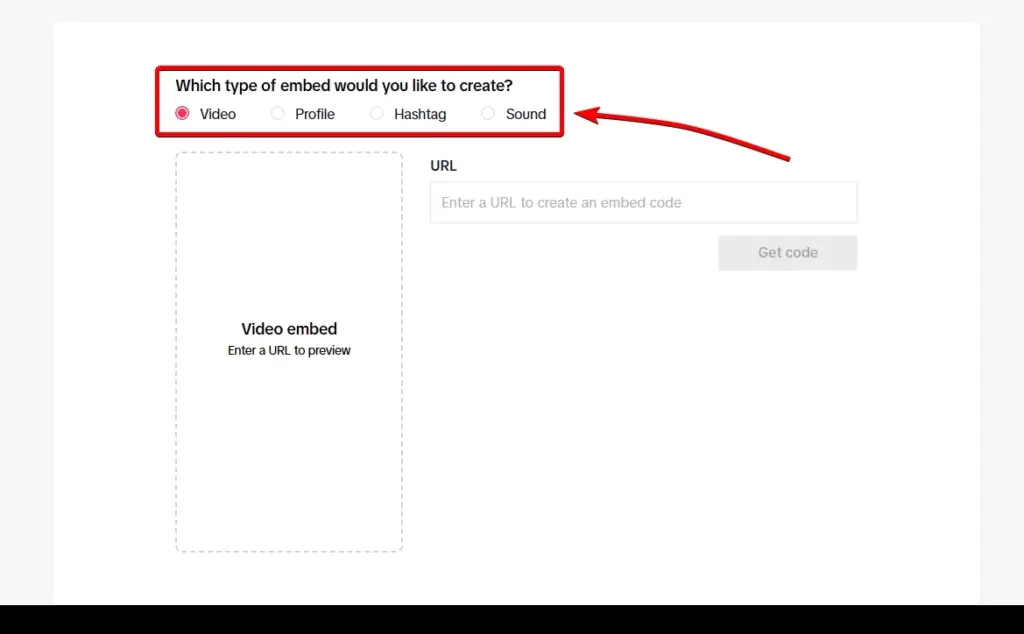
Step 2: Choose the type of TikTok content you want to embed
Right now, you can choose between specific videos, profiles, hashtag pages, and sound pages. You simply have to tick the type of content you’ll be embedding:
Step 3: Copy the specific URL in the empty field
Then, you have to find the content’s URL by opening it via a browser and pressing the arrow icon at the bottom and tapping ‘Copy’:
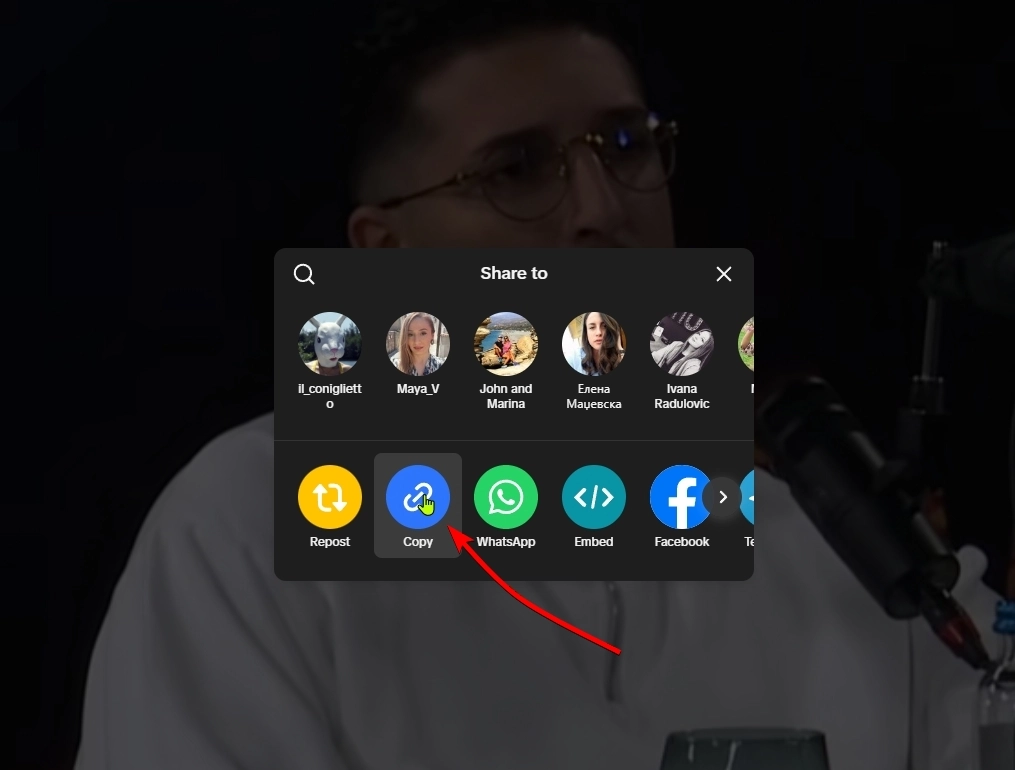
Step 4: Paste the URL and copy the embeddable widget code
Go back to the TikTok Embeds page and paste the URL you’ve obtained. Then, press ‘Get code’ to get your TikTok embed code and a preview of your embed:
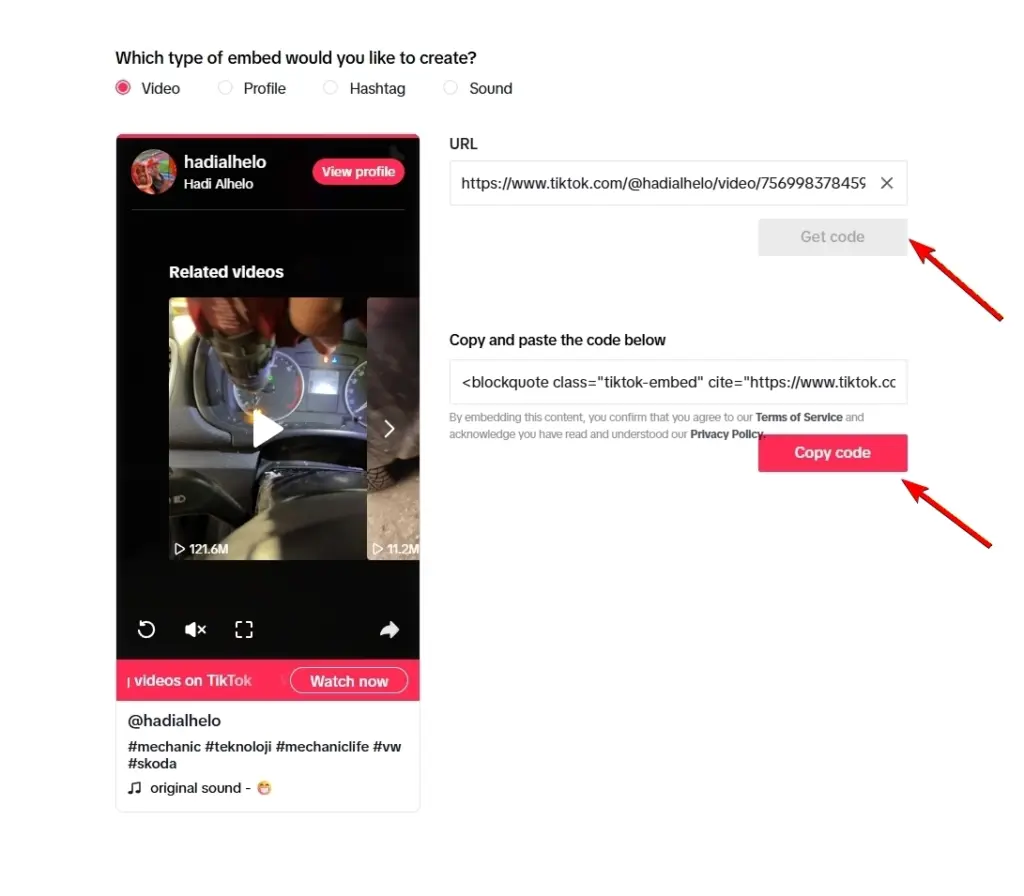
Step 5: Embed the TikTok video on your website
Finally, you simply have to navigate to the specific website page where you want to embed the video, add the corresponding HTML block, and paste the TikTok embed code. I covered how to do all that across all popular website builders in a section above.
If you were to add several videos by tapping ‘Create your own’ during the previous steps, this is how your TikTok embed example would look:

Note: The process is identical regardless of the type of TikTok content you want to embed. You will simply have to copy the URLs of the video, profile, hashtag page, or sound page.
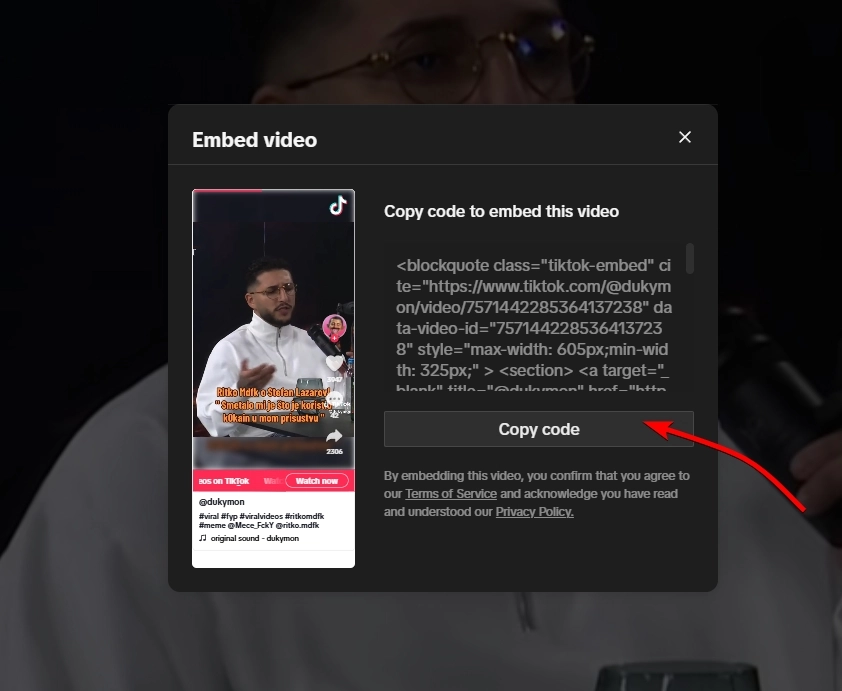
Also, if you’re only looking to embed a single TikTok video, the platform offers developer resources that show you how to immediately get the ‘Embed code’ from specific videos.
Hint: It’s the same method as above, you just tap ‘Embed’ instead of ‘Copy’ in the video’s share menu. Then, you simply paste it onto your website:
Why should you embed TikTok on your website?
TikTok is more than just entertainment!
Brands started noticing the marketing potential of this platform after it was reported that it had more than 800 million monthly active users:

With so many users spending close to an hour daily on the app, embedding TikTok videos on your website helps you capture that energy and turn it into conversions.
After all, users spend an average of 52 minutes browsing the app or creating videos daily, so you might as well promote your product and services there! When you finally decide to embed a TikTok feed on your website, you’ll reap all of these benefits:
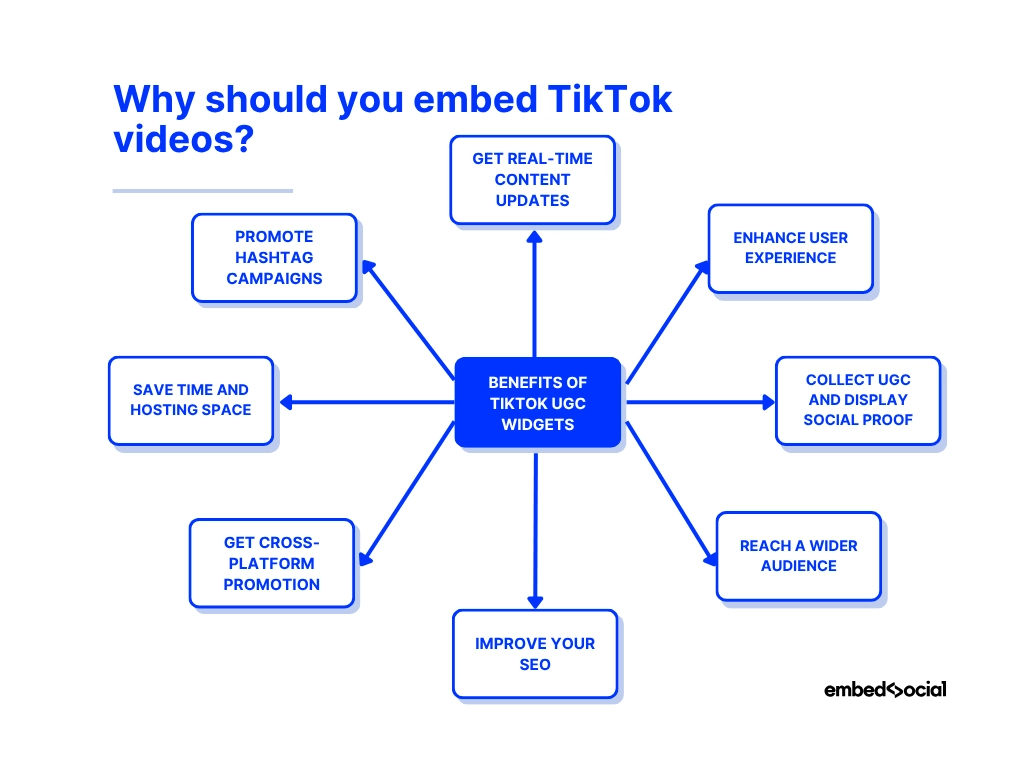
- Get real-time content updates, sync your site with your TikTok account so new videos appear automatically, keeping your website fresh and your visitors hooked;
- Enhance user experience, add motion, music, and storytelling to your pages with embedded videos that make browsing more dynamic and enjoyable;
- Collect UGC and display social proof, showcase real users and their experiences with your brand to build instant credibility and trust;
- Reach a wider audience, tap into TikTok’s global reach to attract younger demographics and expand your customer base and TikTok followers;
- Improve your SEO, increase dwell time and engagement, signaling search engines that your website delivers valuable content;
- Get cross-platform promotion, drive traffic between your website and TikTok profile to strengthen both channels simultaneously;
- Save time and hosting space, embed videos directly from TikTok so you don’t have to upload or host large video files;
- Promote hashtag campaigns, embed campaign videos to inspire participation and keep your branded hashtags trending.
All in all, by turning your website into a live, social hub by embedding TikTok videos, you’ll build up your credibility with the youngest and most enthusiastic audience out there.
Why pick EmbedSocial as your go-to UGC platform?
If you want a reliable, all-in-one solution to embed TikTok videos, EmbedSocial is your best option. It’s a full UGC platform that connects directly with the official APIs of all popular social media platforms, including TikTok, Instagram, Facebook, YouTube, Google, etc. With such a connection you can easily collect, moderate, and display social content automatically:

Here’s why EmbedSocial stands out:
- Official API connections, EmbedSocial integrates directly with TikTok and other social platforms, ensuring stable, secure, and real-time content updates;
- Automated video feeds, connect your TikTok account once and let the system sync every new video automatically, no manual embedding needed;
- Customizable website widgets: choose from grid, carousel, wall, or popup layouts and design them to match your website’s branding and style;
- Shoppable UGC feeds, you can link all the UGC posts you collect to your existing product and service pages, thus streamlining the consumer decision-making process;
- UGC aggregation from all networks, combine videos, posts, and reviews from multiple platforms into one dynamic feed that keeps your website alive;
- Moderation and control, filter what appears on your site with keyword and tag-based moderation tools, or manually approve each post;
- Cross-platform analytics, measure engagement, impressions, and performance of all your UGC sources from one dashboard;
- Scalable for multi-location brands, manage UGC for multiple accounts, campaigns, or stores all from one place without duplication or chaos.
EmbedSocial brings every piece of your social presence, TikTok, Instagram, Facebook, YouTube, and Google: under one roof. It turns scattered user-generated content into branded experiences that boost engagement, SEO, and trust effortlessly.
Imagine having combined widgets that include both your TikTok feed and your Instagram feed, and they automatically pull new content as it comes out. So, whenever you have a new post for your target audience on TikTok, it will appear in your widget as well.
Embed TikTok feed on website: 5 best practices
If you are looking to add a TikTok feed to your website, you should be aware of a few tips and tricks that will help you get the most out of that:
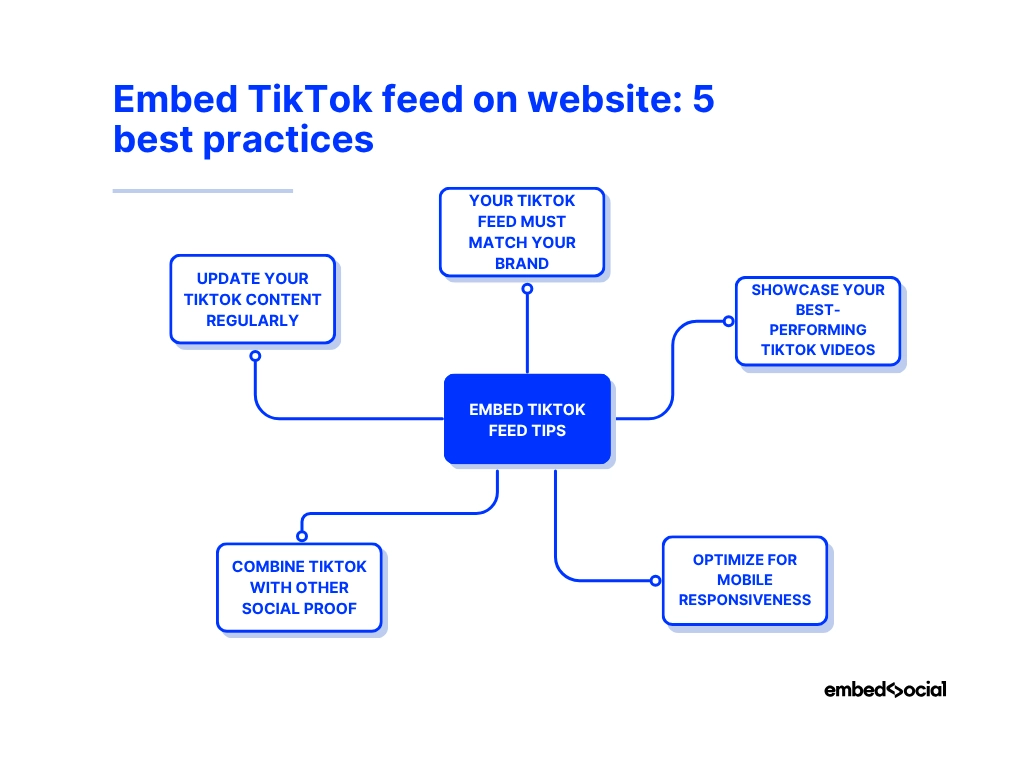
1. Keep your TikTok feed design consistent with your brand
Your embedded TikTok videos should feel like part of your website. So, match your widget’s colours, typography, and layout with your site’s design to create a unified experience.
💡 Example: A fashion brand embeds its TikTok carousel using the same pastel palette as its homepage. The seamless visual flow keeps visitors exploring instead of bouncing off the page.
2. Showcase your best-performing TikTok videos
Don’t overload your feed with every video. Curate your top-performing content, the ones that generate the most views, comments, or shares. Highlight videos that reflect your brand’s personality or promote current campaigns. Also, add a TikTok wall on your website.
Example: A coffee shop filters its feed to display trending recipe clips and customer reaction videos, keeping the website lively and relevant.
3. Optimize for mobile responsiveness
Most TikTok viewers browse on mobile, so ensure your embedded feed adapts perfectly to smaller screens. Use a responsive widget that automatically resizes and maintains fast loading times. This is a huge part of your TikTok SEO practices.
Example: An online boutique adds a responsive grid feed that looks equally sharp on phones and tablets, leading to 25% longer session times.
4. Combine TikTok with other social proof
TikTok alone can drive engagement, but pairing it with other UGC, like Instagram photos or Google reviews, adds extra trust and authenticity. Use a unified social media feed for a complete brand story.
Example: A skincare brand embeds a mixed UGC wall featuring TikTok tutorials, Instagram before-and-after photos, and 5-star Google reviews, all on one vibrant page.
5. Update your TikTok content regularly
An outdated feed makes visitors think your brand is inactive. Schedule regular updates or connect your TikTok account directly through EmbedSocial’s API to ensure new videos appear automatically.
Example: A fitness studio’s live TikTok widget updates daily with new workout challenges, driving repeat visitors who return to see the latest clips.
Conclusion: Embed a TikTok widget to make your website more dynamic!
If you want to bring your website to life and provide authentic social proof that will engage and reassure your visitors, look into embedding TikTok videos.
You can either use the limited native method by copying the embed code of a single video and pasting it into your site or rely on a TikTok widget like EmbedSocial’s. You don’t even need to install a plugin or learn coding. You can immediately embed a TikTok wall anywhere.
With EmbedSocial’s TikTok feed widget, you can take things further by automatically syncing your latest videos and customizing the widget’s look to fit your site. You can also embed a video gallery that combines videos from multiple platforms.
So, start embedding your TikTok videos today to boost visibility, connect with your audience, and turn your website into a living extension of your TikTok presence.
Sign up for EmbedSocial right away or try the 7-day free trial!






![11 Best Social Media Widgets for Websites [+Top Use Cases]](https://embedsocial.com/wp-content/uploads/2023/03/Social-Media-Carousel-widget-template.webp)