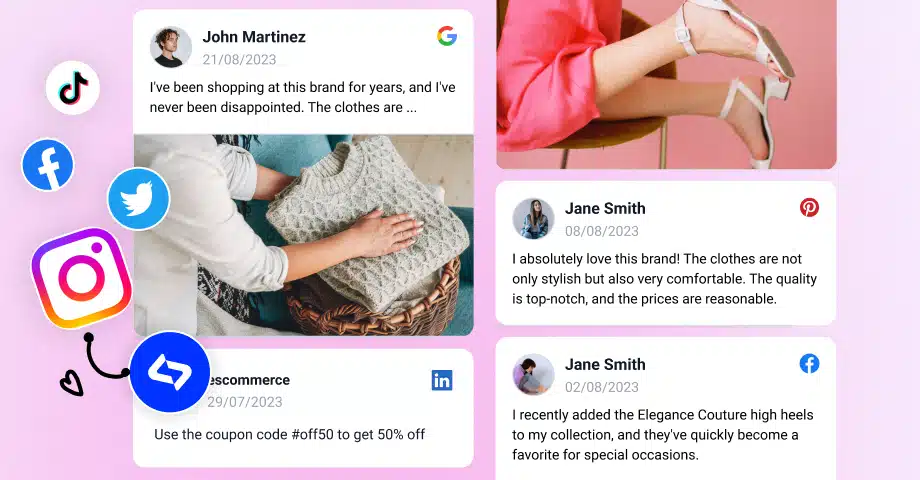

Brands that embed social media feeds on their websites greatly increase their engagement, as they always have fresh content to offer their visitors.
Below, I tell you what they are and how the most successful businesses use them. Plus, you’ll get over 40 social media feed templates you can apply right away.
Needless to say, you will also learn how to use a social media aggregator to add a social wall on your website in minutes! Keep reading to learn more!
What are social media feeds?
Social media feeds are streams of content embedded on a website and generated from social media platforms. Most often, they update in real-time as new posts are added.
These feeds can display a continuous flow of updates, photos, videos, links, etc. from your own social media handles or from other users relevant to your niche.
When embedded into your website, they’ll keep providing fresh content and will allow your visitors to engage with your social media activities via your webpages.
This type of product/service is most often offered by complete UGC platforms that collect, moderate, and help you display these user-generated content examples.
For instance, check out these social media feed templates, all of which can serve a different purpose for your brand, from selling products to engaging visitors:

Why add a social media feed to your website?
Embedding a social media feed is the quickest way to show visitors you’re active, trusted, and relevant without having to make content updates regularly.
After all, when your feed updates, your site updates. Below are the core benefits, shaped for brands that want visibility, credibility, and more conversions:

- Keep your website fresh: show new posts automatically, without manual updates;
- Boost engagement: encourage visitors to scroll, click, and explore your real-time content;
- Build instant trust: prove your brand is active with authentic posts, comments, and reactions;
- Increase conversions: turn UGC into influence that nudges visitors toward buying from you;
- Strengthen SEO signals: reduce bounce rates and keep users on-site longer;
- Unify your brand identity: unite your website and your socials into one cohesive experience;
- Showcase social proof: highlight reviews, mentions, and tagged posts that validate you;
- Repurpose content effortlessly: reuse your social media content on your website.
Think of an embedded social media feed widget as the heartbeat of your website. It regularly pumps new blood in the form of user-generated content, which will keep bringing new visitors to your pages and keep them there long enough so you can convert them.
What types of social media feeds are there?
There are various types of social media feeds depending on how they look and what you use them for. Here are a few of them:
Brand wall
When you want to embed a combined feed from your Facebook, Youtube, or Instagram brand’s posts, the most frequent use case is to showcase your website visitors and your company’s activity. The result is usually a social media wall that contains content posted by your team on all your social media accounts.
Event wall
Event organizers can engage online visitors and display an entire wall with the event attendees’ Instagram hashtag posts. By doing this, you will be able to provide a user-generated view of the conference atmosphere directly on your website. And remember, by embedding an Instagram wall feed, you will never need to update it manually.
Instagram campaign wall
With one of these you can enhance your marketing campaigns and engage with your Instagram audience. People love to connect their offline experience with their online presence. By devising a contest campaign, you encourage users to post their photos using a specific Instagram hashtag. Then, you can add the winners’ content on your website.
Moreover, we can differentiate them based on the social platform used to obtained the user-generated content:
- Facebook feed: Provide your Facebook permissions to create Facebook feeds with the content from your page or content that users post mentioning your page.
- Instagram feed: Instagram users can give permission to their Instagram account and sync all the content they post on Instagram with your website. Additionally, they can specify a hashtag and display the Instagram posts tagged with a particular hashtag.
- TikTok feed: Submit links to TikTok videos and create an entire TikTok video feed for your website. It is a unique feed that provides websites with the engaging power enabled by TikTok.
- YouTube feed: Create a video channel with the videos posted on your YouTube channel, videos that tag specific Youtube hashtags, or videos in a YouTube playlist.
- Twitter feed: Give permission to your Twitter account to sync the Tweets with your website. On top of that, you can add tweets that include a specific hashtag or mention your account.
- LinkedIn feed: Automatically generate your LinkedIn page posts and embed an entire LinkedIn feed on your website that automatically syncs every time you publish new posts.
- Pinterest widget: Aggregate the entire Pinterest board and embed it on your website.
8 top social media feeds examples
No matter if you have an e-commerce store or blog that you want to stand out and engage your users, social media feeds help marketers use their social media presence to boost their website’s performance automatically.
New social media feeds can come in various layouts that you can choose from, such as grid, carousel, slider, and collage layout; use CSS editor or apply other customization options so the feeds fit any website design.
To get a more realistic view of these layouts, check the 5 examples of different social media feeds generated by the EmbedSocial platform:
1. Instagram photos [Slider widget]
Showcase your social media posts in a beautiful, modern carousel layout, perfect for home pages or other landing pages. Here is an example:

See Instagram photos slider demo →
2. Facebook & Instagram mentions [Wall widget]
Display a combination of Facebook, Twitter, and Instagram posts that mention your brand. Click the caption link to view the social media feed demo that you can embed with posts from both your Facebook page and Instagram account:

Instagram and Facebook feed demo →
3. Instagram hashtag feed [Masonry widget]
This is a perfect example of showcasing user-generated content from Instagram. By encouraging users to post their experience by using a hashtag, you are able to collect all that content and display it on your website in a feed like this:

4. YouTube playlist video feed [Section widget]
Generate YouTube videos from a specific channel and display them in a feed that syncs with your website any time you post a video on YouTube. Here is an example:

5. TikTok video feed [Carousel widget]
Curate engaging TikTok videos on trending topics and effortlessly improve your company’s brand awareness. This social media aggregation platform can transform regular videos into a lovely TikTok widget like this one:

See TikTok carousel widget demo →
6. Facebook page social media feed [Collage widget]
Pre-generate all your Facebook page posts and showcase them on your website. Doing this saves time since you’re not publishing the same content on two different platforms:

See Facebook collage widget demo →
7. Pinterest board widget [Collage widget]
Some brands might find their products on Pinterest as well. Embedding these posts in a Pinterest board widget brings the magic of that platform straight to your website:

8. LinkedIn page feed [Slider widget]
As LinkedIn is becoming a very popular platform, users are now able to display and sync their content from LinkedIn on their website by using a social media feed widget from EmbedSocial. Here is an example of a LinkedIn feed widget in a slider layout:

See LinkedIn feed widget demo →
How to create your own social media feed via EmbedSocial?
Creating a social media feed using a social media aggregator like EmbedSocial is very straightforward. Just follow these simple steps:
Step 1: First, log in to EmbedSocial (after creating your account). Then, go to ‘Sources’, and click ‘Add new source’:

Step 2: Choose your source after connecting your account. Depending on platform, you may have access to different source types:

Step 3: After adding your source, you can press ‘Add another source’ to combine different social media platform:

Step 4: Once you click ‘Add another source,’ repeat the process to add an Instagram source:

Step 5: Once you add all the sources you want, select a widget template you like to start customizing your widget:

Step 6: When you’re ready to embed your social media widget, click ‘Embed’ (top-left corner) and tap ‘Copy code’:

Step 7: Last but not least, you need to paste the embeddable widget code in an empty HTML element on webpage of your choosing:

That’s it. Now, you have a gorgeous mixed social media widget that includes both Facebook, Instagram, and other sources you added.
Note: You can add all sorts of social media channels to your widget, inclduing a YouTube playlist, Vimeo videos, TikToks, LinkedIn page posts.
Learn more: How to Embed Instagram Feed on Your Website for Free
The best part is that EmbedSocial’s javascript codes work with all major CMS and website builders like WordPress, Wix, Weebly, Squarespace, Pagecloud, etc. They also work with newer design tools, so you can embed a social media feed in Figma Sites.
Here you can see how the social media widget works once it is embedded:
Top 40+ social media feeds and templates to use today!
Why not explore EmbedSocial’s full social media widgets library to find a widget that can energize your static website content!
You can browse by source, like Facebook, Twitter, Instagram, Pinterest, YouTube, etc. or by widget layouts like grid, slider, popup, or collage.
Click below to get started with your new social media widget:
Conclusion: Turn your website into a living, breathing social hub
A social media feed pulls your brand out of the shadows and places it directly in front of the people who matter. It keeps your site alive with real voices, real stories, and real proof that your business is worth paying attention to, so visitors stay longer.
You’re already creating content every day, like posts, stories, reels, reviews, mentions. Embedding all of them on your website simply lets it work twice as hard for you.
So, if you want your site to feel current, credible, and connected to your audience, a social media feed is the easiest win you’ll ever implement.
Add your EmbedSocial social feed today! Let your website talk about your brand loudly!





![11 Best Social Media Widgets for Websites [+Top Use Cases]](https://embedsocial.com/wp-content/uploads/2023/03/Social-Media-Carousel-widget-template.webp)
![How to Embed Testimonials on Website in 2026 [2 Methods + Tips]](https://embedsocial.com/wp-content/uploads/2022/11/testimonials-dark-single-slider.jpg.webp)