

Blending your social media presence with your official WordPress website has never been easier with tons of WordPress Instagram plugins. You don’t need coding skills, the installation is just a few clicks, and most of the Instagram plugins are easy to set up and, in some cases, even free. If you prefer a hosted option, EmbedSocial’s Instagram feed widget works on any WordPress site.
If you’re interested to learn more about the “why’s,” - stick with us; we will cover that thing as well, or jump straight to find your Instagram widget from the table of contents below:
If you are here for the list - let’s get down to it:
Plugin Name
Pros
Cons
Official integration with Instagram and Google Reviews, advanced customization options, built-in Schema code. Offering Shoppable widget.
Free version is limited, subscription-based for full features
WPZOOM Social Feed Widget & Block
Easy to set up, supports block widgets, customizable
Limited functionality in free version
User-friendly, real-time feed updates
Pro features require a subscription
Highly customizable, supports multiple social media platforms
No free version for advanced features
Versatile feed display options, completely free
Limited features compared to premium plugins
Simple Instagram feed slider, responsive
Free version lacks certain customization options
Direct Instagram photo posting, customizable titles
Limited basic version, fewer reviews
Supports multiple media sources, includes templates library
Paid plugin only, limited support duration
Completely free, easy setup, mobile-friendly
Basic feature set, few reviews
Customizable feed views, free and pro options
Lacks frequent updates, unreliable support
Supports multiple platforms, unlimited feed options, easy setup
Support response time can be long
Supports multiple platforms, versatile layouts
Complex setup, requires some coding knowledge
Carousel and grid feeds, mobile-friendly, customizable
Basic version lacks features
Versatile social feed, includes Facebook integration, free version has basic features
Limited advanced features in the free version
Versatile gallery options, includes video and photo galleries
Free version issues, more suitable for portfolios
Drag and drop, responsive, optimized for speed
Suitable mainly for slideshow needs, slow support team
Supports multiple platforms, includes Woocommerce integration
Only available as a paid version
Easy to customize, supports multiple platforms, various gallery layouts
Limited features in free version
Specialized Instagram features, simple setup
No free version, expensive
Versatile customization, multiple layouts, fast support
Only a paid version available
Shoppable Social Media Galleries by SNPT
Free to set up, shoppable galleries integration
Mixed reviews, lacks stability
1. EmbedSocial’s Official WordPress Instagram Plugins
EmbedSocial as a platform can be used on any WordPress website without the installation of a plugin. The plugins enable users to easily submit shortcodes that replace the bigger JavaSctipt code that might appeal as unfriendly to users without coding skills.
Here are the WordPress plugins by EmbedSocial:
EmbedSocial - WordPress plugin for Instagram feeds and social media aggregator

This is the official EmbedSocial plugin that users use to generate Instagram photos or Instagram reels, embed Instagram feeds, and other similar widgets like Google reviews or Facebook reviews. The plugin is very simple and supports a shortcode, so users can have a simpler method to embed the widgets they create in the EmbedSocial platform.
It is one of the complete platforms for creating social media widgets, and its capabilities range as follows:
- Generate and embed Instagram account feed;
- Collect and display Instagram Reels that other people post mentioning your account;
- Display Instagram posts that people publish by using a specific hashtag.
EmbedSocial provides a native Instagram feed plugin but can also be used as a separate platform that has an official integration with the Instagram API, allowing fast generation of Instagram content, Instagram images, or videos without any manual work.
EmbedSocial - Plugin to display Instagram Stories

EmbedSocial is an Instagram stories platform that allows people to generate their Instagram stories and embed them on any website, specifically WordPress. This is simplified with a WordPress plugin for Instagram stories that enables users to sync their Instagram stories with their WordPress website automatically.
This plugin works seamlessly without manually updating the website each time you have a new story.
For more automation, the tool can be used without installing the plugin. You will only need to embed one code, which will not require installing and maintaining another plugin.
2. WPZOOM Social Feed Widget & Block - Instagram feed plugin

WPZOOM Social Feed Widget & Block Preview
Average Rating: 4.3 out of 5 stars (32 reviews)
Pros
- Instagram-only plugin that’s easy to set up and highly customizable
- allows you to create multiple feeds
- it has multiple layouts
- you can add your custom avatar and bio
- works with the new WordPress 5.8 block-based widget screen
- responsive and fast support
Cons
- the pro features are amazing but belong to the paid version
- very few reviews to rely on the plugin for sure
3. Spotlight - WordPress Instagram feeds plugin

Spotlight Preview
Average Rating: 4.8 out of 5 stars (124 reviews)
Pros
- Instagram-only plugin which is easy to use, 100% responsive, SEO-friendly, accessible
- fast and helpful support team
- you can connect multiple Instagram accounts
- you can use free pre-designed templates
- the free version comes with the grid layout with 20+ design customization options
- you can order your Instagram posts by date, popularity, or random
Cons
- only pro-version will provide you with more template design, options to customize your feeds, unlock hashtag feeds, apply filtering and moderation, add a shoppable Instagram feed, and other features as well. The 3rd party integrations with Elementor and Google Analytics also belong in the premium version.
4. Smash Balloon Social Photo Feed - WordPress plugin for Instagram photos on website

Smash Balloon Social Widget Preview
This is one of the most popular WordPress Instagram Plugins with an average rating: 4.9 out of 5 stars (3,806 reviews)
Pros
- specialized and top-rated WordPress plugin for Instagram only
- simple to set up and completely customizable
- GDPR Compliance automatically integrated
- display photos from multiple accounts
- responsive and mobile-friendly
Cons
- the free version doesn’t have a carousel
- the plugin slows down the site
- the pro version with all features is too expensive, and the basic version has its limitations
- the support team is slow
5. Social Feed Gallery - WordPress Instagram plugin for galleries

Social Feed Gallery Preview
Average Rating: 4.5 out of 5 stars (138 reviews)
Pros
- Instagram-only plugin
- simple and easy to set up
- customization options
- API use optimized
- available in seven languages (English, Dutch, French, German, Italian, Russian, and Spanish)
Cons
- the most helpful features are paid ones
- the plugin itself is buggy
- very little support with issues
6. Social Slider Feed

Social Slider Feed Preview
Average Rating: 4.1 out of 5 stars (118 reviews)
Pros
- simple and efficient
- versatile ways to display images
- available for versatile platforms and not only Instagram
- available in four languages (English, Dutch, Swedish, Portuguese)
Cons
- updates messing up some versions of it
- the support team is not reachable
- you have to update to pro in order to have all features
7. Intagrate Lite - WordPress plugin for Instagram feed galleries
Integrate Lite Preview
Average Rating: 3.8 out of 5 stars (20 reviews)
Pros
- widget suitable for posting each photo from Instagram to your website directly (instead of creating an entire Instagram feeds)
- the post title on the website is customizable
- fully compatible with Instagram and Facebook API
Cons
- relatively new to the market with a very low number of reviews and installations
- pro version is pricy
- the basic version is very limited
- the reviews posted are very old - meaning people are not installing it very often
- read more about it here
8. Essential Grid Gallery - WordPress plugin for versatile social feed galleries
Essential Grid Preview
Average Rating: no data
Pros
- suitable for creating image, video, and audio galleries from various sources such as NextGen Gallery, Instagram, YouTube, Vimeo, Twitter, Flickr, or a completely custom gallery grid
- this paid plugin comes with a templates library
Cons
- there is no free version, only paid one, which starts at $34 annually for 1 website only
- with the paid amount comes only 6 months of paid support
9. Social Gallery and Widget - WordPress plugin to embed Instagram feeds

Social Gallery and Widget preview
Average Rating: 4.3 out of 5 stars (3 reviews)
Pros
- completely free
- Instagram-only widget that’s easy to set up
- responsive and mobile friendly
- display up to 30 Instagram feeds in versatile ways (small or large-size photos)
Cons
- because there’s only a free version, the features feel basic and underdeveloped
- there are very few reviews
- the last update was 5 months ago, which means it might not be up-to-date with the latest WordPress versions
10. WebSocial - WordPress plugin to display Instagram posts

10WebSocial Preview
Average Rating: 4.6 out of 5 stars (347 reviews)
Pros
- it’s a completely free Instagram plugin for WordPress
- the company that developed this widget offers versatile paid solutions (pro)
- responsive and mobile-friendly with pre-made and customizable themes
- customizable feed views: blog style, thumbnails, masonry, compact album
Cons
- very little information on their official page
- lacks updates so that the plugin works with the latest WordPress versions
- their pro WordPress bundles start at $85
- the support is unreliable
11. Feed Them Social - WordPress plugin for Instagram feeds on website

Feed them social Preview
Average Rating: 4.7 out of 5 stars (559 reviews)
Pros
- suitable for usage with versatile platforms such as Facebook, Twitter, YouTube, and not only Instagram
- no limitations on the number of feeds
- there are two feed options: Instagram user feed and hashtag feed
- responsive and easy to set up
- customizable font colors
- Like and/or Follow buttons above or below any feed
- the free version has enough features
- there’s an Instagram feed demo where you can see what features the widget offers
Cons
- the support on the basic free plugin responds within 48 hours which can be a long time if you’re facing an issue
- their all-access bundle starts at $199
- some reviews mention some loading issues with their feeds
- read more about it here
12. Photonic Gallery

Photonic Gallery Preview
Average Rating: 4.8 out of 5 stars (167 reviews)
Pros
- besides Instagram galleries, this plugin supports Flickr photos, Album (Photosets), Galleries, and Collections, Google Photos, SmugMug folders, and Zenfolion photos
- completely free plugin
- the plugin supports not only images but videos too
- versatile layouts to display your galleries in multiple forms
- Comprehensive documentation to help you understand how the plugin works
Cons
- The setup and descriptions feel complicated, and like you need coding knowledge
13. Enjoy Social Feed
Enjoy Social Feed Preview
Average Rating: 4.2 out of 5 stars (101 reviews)
Pros
- Instagram-only plugin suitable for personal or business use, the basic features will allow you to display your profile-based feed plus create hashtag feeds
- this plugin has a carousel and grid feed with its free version
- the number of columns and rows is customizable
- fade in effect for Instagram grid view
- responsive and mobile-friendly
- here’s a detailed guide on how to set up your Instagram feed
Cons
- the basic version lacks some features but there’s a premium version with more than the above-mentioned features
14. Easy Social Feed
Easy Social Feed Preview
Average Rating: 4.6 out of 5 stars (461 reviews)
Pros
- suitable for both Instagram and Facebook - easy to set up, fully customizable, and responsive
- in the free Instagram widget version, you will have the ability to change the number of columns, colors, and borders; create multiple skins; add a load more button to display unlimited photos; have a follow button, and display a header at the top of the feed
Cons
- multiple feeds, advanced popUp, carousel gallery, videos gallery, displaying hearts and comments, fully customizable layouts, image filters, animate filters, and priority support are all part of the pro version
- the free version is very limited
- here’s a demo to see how it works
- the Instagram Feed pro for one site starts at $32 annually and together with the Facebook Feed pro they are $57,27 annually
- some people are reporting the support is missing even on the paid version
15. Grid KIT Portfolio
Grid KIt Portfolio Preview
Average Rating: 4.4 out of 5 stars (291 reviews)
Pros
- a plugin designed to help you with building simple portfolio galleries, video or photo galleries, product catalogs, image sliders, Instagram feed, clients’ or team members’ gallery
- responsive, mobile-friendly, pop-up add-on, layout builder included in the free version, and shortcode add-on
- excellent support team
Cons
- it’s not an Instagram-only WordPress Plugin meaning it might not have all the features needed - more suitable for portfolio display needs
- the free versions should include the “layout builder,” but users are reporting it’s not working properly and that they should upgrade to the pro version
- the free version is very limiting
16. Slider by Soliloquy
Slider by Soliloquy Preview
Average Rating: 4.7 out of 5 stars (987 reviews)
Pros
- drag and drop slider plugin for WordPress that’s easy to use yet powerful in its features
- with this plugin, you can create a responsive image and video sliders for your WordPress site
- mobile-friendly, SEO-friendly, and optimized for speed
- a variety of pre-made templates + CSS customizable themes
- carousel gallery for images and videos
- dynamic slides
- slides with thumbnails
- Instagram slides
- PDF slides
- video slides
- custom HTML slides
- transition effects
Cons
- the support team is slow
- suitable for photographers, developers, designers, bloggers, and small businesses, yet according to the features, it’s most suitable when you want to create slideshows only, meaning it might not be suitable for showcasing your Instagram feeds on your website
17. Social Stream
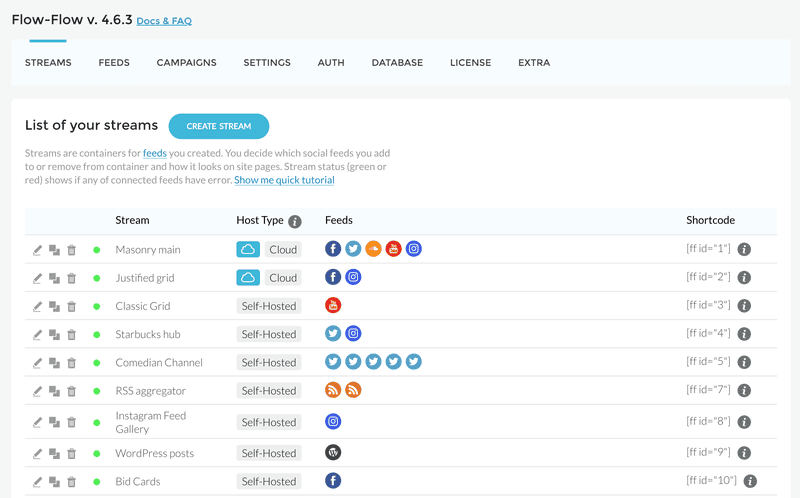
Social Stream Preview
Average Rating: no data
Pros
- suitable for Instagram, YouTube, Facebook, Twitter, and more
- premium support with a response time usually within 1 business day
- works with Shorcode (no plugin required)
- comes with a powerful skin builder to help you create unique skins with an intuitive drag and drop interface
- multi-rows support, touch carousel, and slider
- versatile layout possibilities (grid, masonry, and justified)
- Woocommerce support
Cons
- there’s only a paid version and no access to reviews that can tell you more about the customer’s experience
18. Visual Portfolio
Visual Portfolio Preview
Average Rating: 4.9 out of 5 stars (199 reviews)
Pros
- available for Instagram, Youtube, Vimeo, Unsplash, Twitter, Flickr, Google Photos, Dripple, Twitch, RSS, VK
- visual gallery builder that will help you build gallery blocks without coding knowledge
- convenient, powerful, yet simple to install
- various layouts available such as Masonry, Justified, Tiles Gallery, Grid Gallery, and Slider Gallery
- optimized to be fast and lightweight
- additional visual effects such as classic style, fade effect, emerge effect, fly effect, and caption move effect
- easy to customize
- portfolio post type
- powerful lightbox
- mobile optimized, GPU accelerated, Smart loading
- video and audio support
- SEO friendly and multilingual
Cons
- the paid version starts at $34 annually
- the free version has very limited features and no support
19. Intagrate - Instagram posts WordPress Plugin
Intagrate Preview
Average Rating: no data
Pros
- Instagram specialized plugin which equals features tailored to your needs
- simple to set up and easy to use
- multiple streams (multiple Instagram accounts, images with hashtags, or certain location)
- video integration
- image moderation
- scheduled posting
- hashtag filtering
- multisite compatible
- multiple image posting
- access to image history
- full content control and easy image admin
- full support and documentation
- read more about it here
Cons
- no free version
- the paid version is expensive
- no reviews from customers to read for other people’s experience
20. AccessPress - Instagram Feed Pro
AcessPress Preview
Average Rating: no data but more than 2.000 sales
Pros
- Instagram-only plugin
- versatile templates available
- 2 grid layouts (Grid and Slider) + 2 Carousel Layouts
- timeline layouts
- 5 filter designs
- show Instagram feeds with any user timeline or any hashtag
- versatile customization options
- image sorting option
- 6 different lightboxes to choose from
- Instagram follow widget in the sidebar
- their support and discussion page look like they respond quite fast
Cons
- there’s only paid version, but it’s quite affordable
- the reviews uncover a lot of issues and unsatisfied customers
21. Shoppable Social Media Galleries by SNPT - WordPress plugin to create Shoppable Social Media Galleries

Shoppable social media galleries Preview
Average Rating: 3.9 out of 5 stars (37 reviews)
Pros
- a plugin to help you embed shoppable social media galleries on your website with the goal of increasing your conversion rates
- a free plugin that’s easy to set up
- with its help, you could embed shoppable Instagram feed galleries and carousels into your store
Cons
- reviews are mixed and the plugin is relatively new
- there is no pro version meaning it might be unstable to use, the support team is unreliable, and some pro features might be missing
The benefits of WordPress Instagram plugins for your website
Mixing your social media presence with your website comes with quite a few benefits, so in case you have doubts, here are all the “whys” to help you make your decision:
- Boost conversion rates - one of the most important marketing goals of all time is boosting conversion rates. By blending your Instagram profile presence, and hashtag feeds from campaigns (user-generated content). Employee-generated content with your website content, you are looking to increase your brand credibility and indirectly encourage people to buy more of your products/services.
- Wider social media reach and increased engagement- once you share your Instagram profile on your website encouraging- you can drive your traffic from your website to your Instagram profile meaning your followers number will increase and, therefore, your engagement rates.
- Increase brand awareness - once your site visitors and Instagram account followers increase - your brand will become visible to more people - meaning higher brand awareness.
Embed Your Instagram Feed to Your WordPress
Finally, here are the steps to showcase your Instagram feed on your WordPress websites using the EmbedSocial WordPress plugin.
- Step 1: Create an account in EmbedSocial
- Step 2: Connect your Instagram account via the Facebook permissions dialog
- Step 3: Create an Instagram widget and copy the WordPress shortcode

Step 4: Go back to WordPress and go to Plugins to search for the EmbedSocial plugin in the search bar. Click to Install the plugin
Step 5: Open a WordPress page and click the + button to add a Shortcode block

Step 6: Paste the shortcode, and the Instagram feed will appear immediately.
For a detailed tutorial, please follow this link: Embed Instagram feed in WordPress
Key takeaways
Embedding your Instagram profile to your WordPress website with a plugin is simple, fast, and affordable, yet doing so comes with a lot of benefits we’ve mentioned.
We hope the extensive list we’ve created with the pros and cons of each plugin will help you make your decision much easier so you can start displaying your photos, campaigns, and employee-generated content as soon as possible.
Have you tried some of the plugins, and how did they work for you? We’d love to hear about your experience.
Thank you for reading through.





![11 Best Social Media Widgets for Websites [+Top Use Cases]](https://embedsocial.com/wp-content/uploads/2023/03/Social-Media-Carousel-widget-template.webp)
![How to Embed Testimonials on Website in 2026 [2 Methods + Tips]](https://embedsocial.com/wp-content/uploads/2022/11/testimonials-dark-single-slider.jpg.webp)
