

Displaying your brand’s Twitter feed on your website has some benefits and it provides your website visitors with more information about your recent activity.
We can all agree that it is not a necessity if you do not use your Twitter account that often.
But what if the mentions from your followers’ tweets contain compliments, a photo of somebody wearing your product, or just a simple thank you note from a satisfied customer.
Then, displaying your Twitter mentions is becoming something else.
They are becoming actual customer testimonials that for sure you want to have your hands on.
Here is why Twitter mentions of your brand are a great source of customer testimonials:
- Simple, short and direct -thanks to the Tweets’ core format
- Authentic - user profiles are public and can be identified if the testimonial comes from a real person
- Energetic - when a customer goes to Twitter to write you how satisfied they are with your product, that tweet is usually made in a moment of excitement
Once you understand why your company needs to take control of your Twitter reputation, here is how you can use EmbedReviews to collect Twitter mentions and embed them on your website.
Here is how to collect Twitter mentions
Here are the steps on how to add Twitter to your reviews sources.
First, log in to your EmbedSocial account and do the following:
-
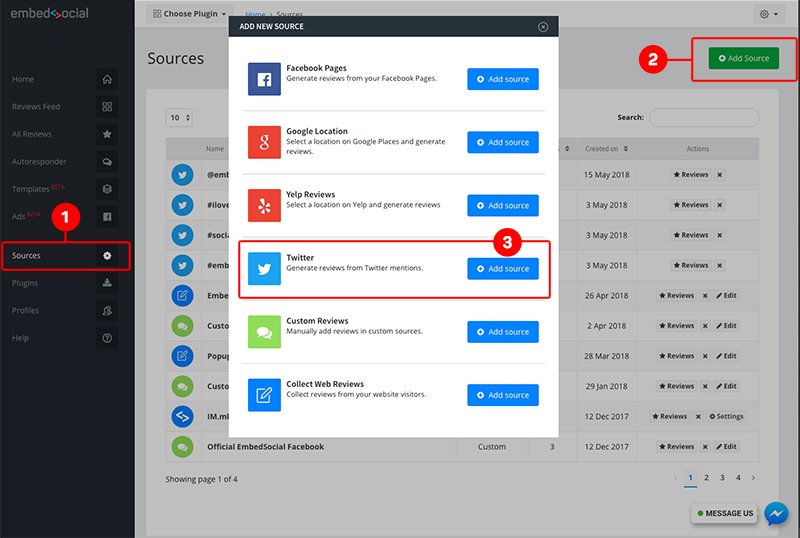
Click on ‘Sources’ in the main left menu
-
Click ‘Add New’
-
Find Twitter and click the ‘Add Source’ button displayed in the same row
-
Type your Twitter handle/username and click ‘Create’


Please note that when the first time you connect your Twitter account, the system will import the mentions from the last 7 days.
Here is how to embed Twitter reviews:
Once you’ve generated Twitter mentions, you can create a Reviews feed and embed the Twitter reviews with the provided code.
To do this, follow the steps below:
-
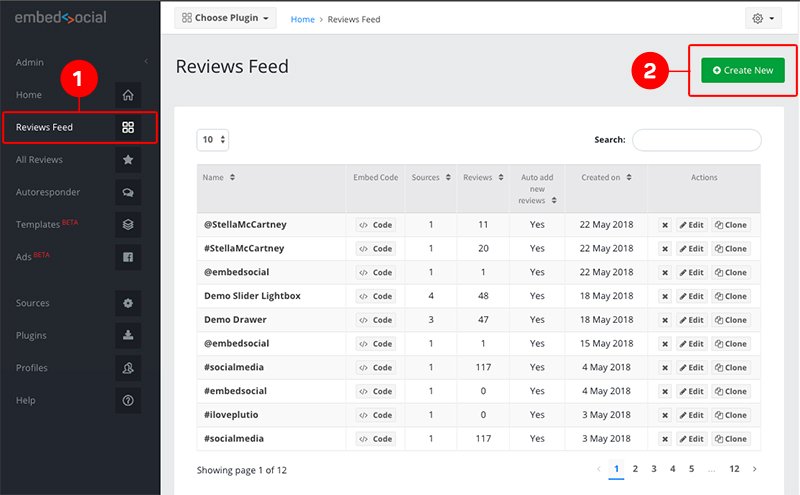
Go to ‘Reviews Feed’
-
Click ‘Create New’
-
Select the Twitter source you’ve just created
-
Click ‘Create’

-
Copy/paste the top-right code in your website body section.
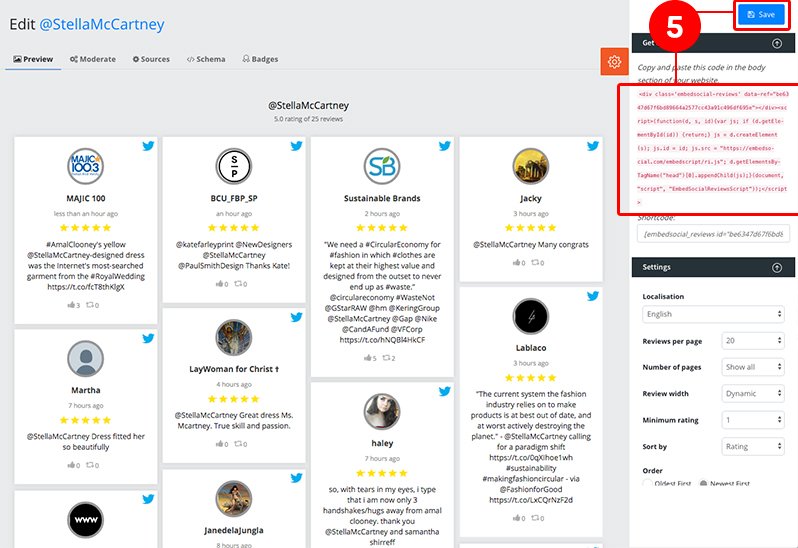


That’s it.
Your twitter reviews feed will display on your website, in seconds.
If you want to show your full timeline instead of just testimonials, learn how to embed a Twitter feed on your site.
Related to this, you can use EmbedSocial to combine reviews from multiple sources and display them on one page or in one reviews widget.
Here is how to combine Twitter reviews with your Facebook or Google reviews
Follow the same steps above to add Facebook Page or Google locations as a source of reviews.
Once you’ve created the reviews feed, you can add more review sources, that will fetch reviews from more sources such as Twitter.
To do this follow the steps below:
-
Open your reviews feed and click the ‘Sources’ tab
-
Select your Twitter source by clicking on the checkbox in front of the souce name
-
Click ‘Save’
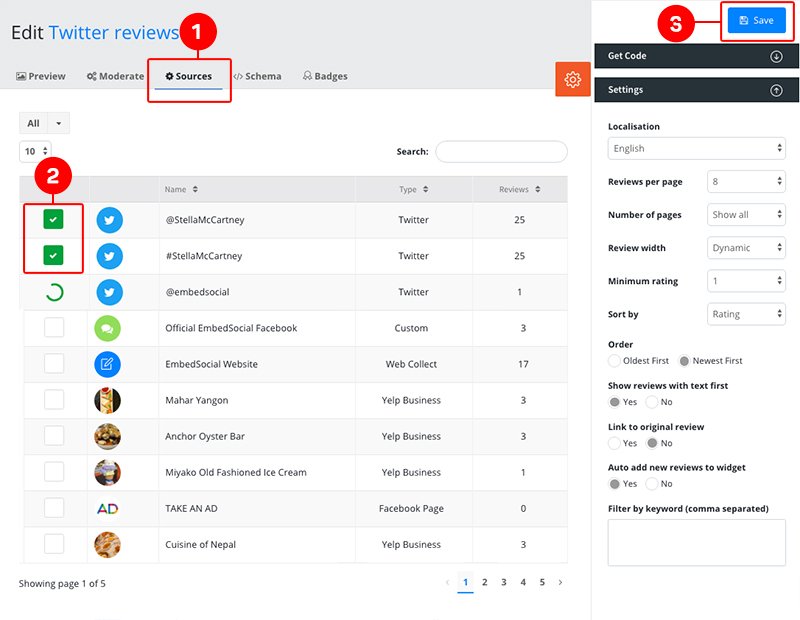

Now you’ve created a reviews widget that will contain all the reviews from various sources including your Twitter mentions.
Hope this tutorial helps you take more control of what customers talk about your business online.
If you still do not have an EmbedSocial account, click here to start a free trial.
Manage Twitter Reviews
Show social reviews, boost trust on your website and increase conversions.





![11 Best Social Media Widgets for Websites [+Top Use Cases]](https://embedsocial.com/wp-content/uploads/2023/03/Social-Media-Carousel-widget-template.webp)
![How to Embed Testimonials on Website in 2026 [2 Methods + Tips]](https://embedsocial.com/wp-content/uploads/2022/11/testimonials-dark-single-slider.jpg.webp)