
NewAnnouncing Filter your feed by source, just ask the AI

Best LinkedIn Feed App for Shopify

Add a LinkedIn feed to your Shopify store with only one line of code!

Nick Poggi, TrovaTripRyan HazlewoodZanna Ollove, Boston CollegeBrooks Hitzfield, Seven Sons

Loved by 300,000+ big and small brands. World-famous and local

Mercedes-BenzFordEmiratesUniversalBest WesternVaynerMedia

What is a LinkedIn Feed for Shopify?

A LinkedIn feed for Shopify is a dynamic content block you can add to your online store that displays real LinkedIn posts, great for both B2B and B2C commerce.

Whether it’s simple text-based updates or visual-based posts, this feed includes authentic content, right on your homepage, product page, or anywhere else.

With the EmbedSocial: Shoppable UGC app, you can transform those LinkedIn posts into a powerful e-commerce engine, as each post can be tagged with your Shopify products, making your UGC feed instantly shoppable, from awareness to checkout, it helps you shorten the customer journey using real customer photos and videos.

This isn’t just a gallery, it’s your most trustworthy and engaging sales assistant.

No coding skills or technical knowledge is required!

Benefits of a LinkedIn feed widget for Shopify

Adding user-generated content to your Shopify store does more than just make your site look good, it changes the way your visitors shop for a few reasons:

  • Build trust at a glance , Customer content builds credibility, as social proof is one of the strongest trust signals, so seeing real people using your products makes others buy them.

  • Drive more conversions , Shoppable LinkedIn widgets make your UGC a seamless part of your sales funnel, as you can tag products in posts and link directly to product pages.

  • Increase engagement , LinkedIn posts naturally capture attention. When visitors see relevant content from real users, they stay longer and explore more of your site.

  • Encourage repeat purchases , Showcasing a diverse range of customer experiences inspires new product discovery, helping you boost average order value and repeat sales.

  • Reduce returns , Clear expectations make happy customers. UGC helps set realistic expectations, lowering your return rate and increasing satisfaction.

  • Boost SEO and time-on-site , A dynamic LinkedIn feed refreshes your content frequently, which helps keep your site fresh for both users and search engines.

The EmbedSocial: Shoppable UGC app is built specifically for Shopify users who want to make the most out of their user-generated content. Here’s what you get:

Features of our LinkedIn feed app for Shopify
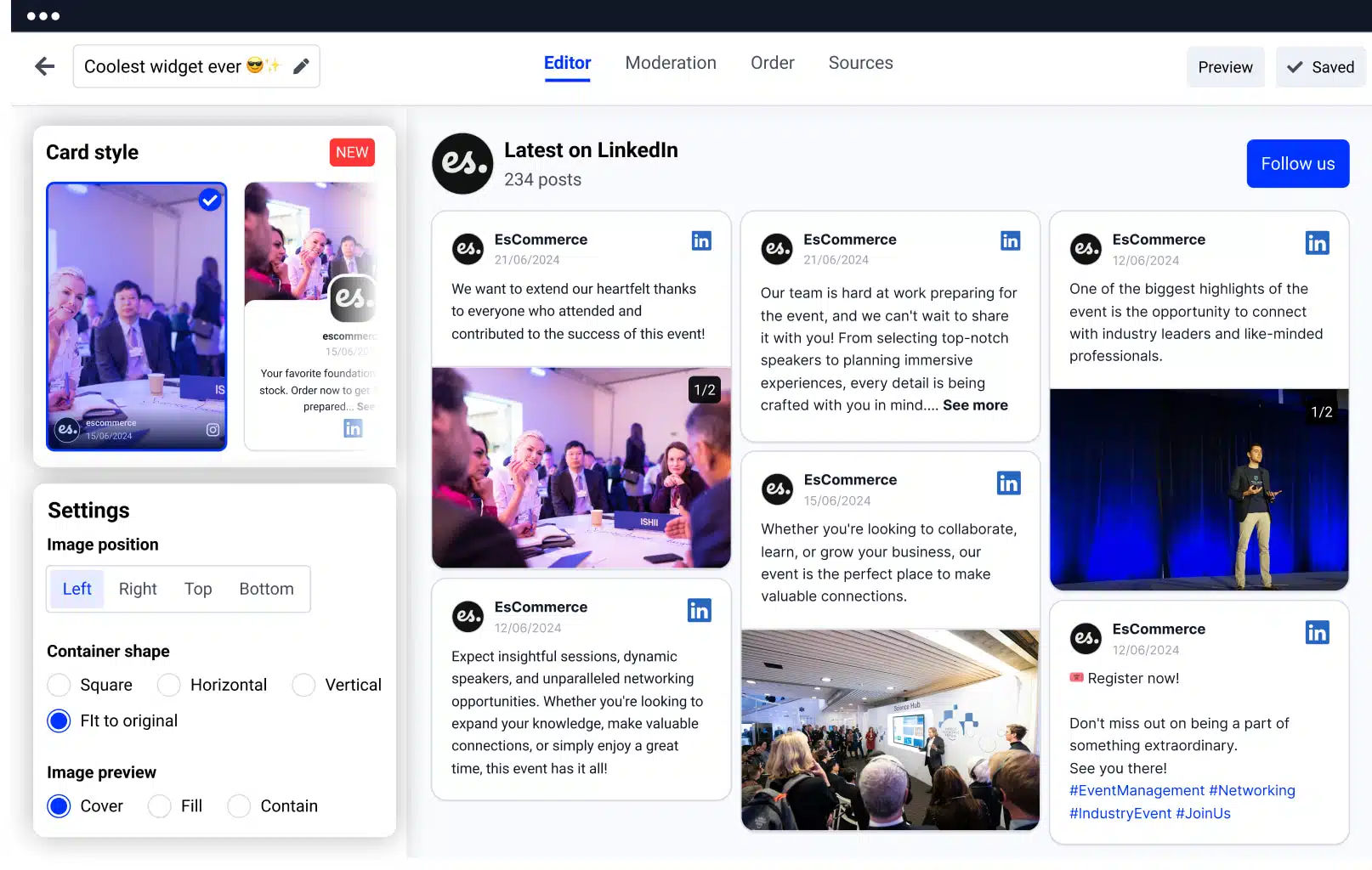
LinkedIn widget for websites
  • Shoppable posts , Tag multiple products in a single post. Let customers browse directly from your LinkedIn content and shop instantly.

  • LinkedIn page posts , Auto-import content from your LinkedIn page. Turn your community into your most powerful marketing asset.

  • Product cards below each post , Display product names, prices, and direct “Buy Now” buttons beneath each image or video.

  • Advanced layouts and customization , Choose from slider, grid, collage, or highlight widgets, and customize every design element to match your brand.

  • AI-powered content summaries , For stores with lots of UGC, summarize content with AI-generated highlights, giving new visitors a quick snapshot of customer sentiment.

  • Auto-updating feed , Once connected, your feed updates automatically, no need for manual uploads or maintenance.

  • Responsive on all devices , Whether on desktop, mobile, or tablet, your LinkedIn widget looks and functions beautifully.

  • No-code embed , Copy and paste the embed code into your Shopify theme.

How to embed a LinkedIn feed in Shopify

Adding a UGC-powered LinkedIn widget to your Shopify store is easier than ever. Just follow these simple steps to have it up and running:

  1. Step 1: Install our Shopify app

    Go to the Shopify App Store and install EmbedSocial: Shoppable UGC.

  2. Step 2: Set up your EmbedSocial account

    Choose a plan that fits your store’s needs. You can start with a free trial, explore all the features without any risk, and cancel within 7 days if you choose to.

  3. Step 3: Connect your LinkedIn source

    Once you login, your products will be automatically generated from Shopify and you will be able to see them in the Products catalog page. Next, go to Sources and connect your LinkedIn page to start aggregating your LinkedIn posts.

  4. Step 4: Create and design your widget

    Once you create the widget, you will be able to fully customize it in the editor.

    Choose the layout, customize the design and go to the Links menu to tag the LinkedIn posts with the respected Shopify products. All the product information will be automatically pulled with the image, price and product name.

  5. Step 5: Copy the widget embed code

    When you’re happy with your widget, click the Embed tab and copy the embeddable code.

  6. Step 6: Paste into your Shopify theme

    Navigate to your Shopify admin → Online Store → Themes → Edit Code. Paste the embed code where you want the feed to appear, such as your homepage or product page.

    And just like that, you got a live, stunning widget that auto-updates and showcases your products so that you can turn browsers into buyers.

Getting started: Turn your customers into your best sales team. Install the EmbedSocial: Shoppable UGC app and start building trust, engagement, and conversions with real LinkedIn content, automatically synced and shoppable.

👉 Install our UGC feed app on your Shopify storeSee full tutorial →

Frequently asked questions

FAQs about the LinkedIn widget

Have a specific question about embedding the LinkedIn widget? Check the FAQ section below or click the bottom right chat icon and talk with us.

How to embed my first LinkedIn widget?
To get started, sign up for a free trial and follow the steps below:
1. Connect your social media accounts
2. Customize and moderate your feed
3. Copy & paste the embed code into your website
Can I moderate the posts?
Yes, you can handpick which posts show in your feed. The moderation options are various, which means you can filter only posts posted after specific dates or posts that include certain words.
Can I aggregate from multiple social media accounts?
Yes, the system supports multiple social platforms connecting to a single EmbedSocial account. Check our pricing plans and choose which plan suits the number of pages and accounts you have.
Can I make my social media feed shoppable?
Yes! EmbedSocial provides options to add custom ‘Buy’ buttons in the feed posts that, when clicked, can lead web visitors to the checkout page where they can buy the selected product.
Can it display all the new posts automatically?
Yes, you can enable or disable automatic social media aggregation at any time.
Can I track interactions in the widget?
You can enable Google Analytics tracking of the feed by entering a Google Analytics ID, such as: UA-XXXXXX-YY.
Can I customize my LinkedIn widget?
Yes, you can choose from multiple templates or use a custom CSS editor to make your social media feed fit your brand and website design. Additionally, you can enable localization options to make sure it fits your language.
Is EmbedSocial GDPR compliant?
Yes! EmbedSocial is GDPR-compliant and abides by the rules of each social media network policy from where you collect content.
Is EmbedSocial compatible with web builders?
EmbedSocial integrates and works with all major content management platforms and web builders, such as WordPress, Squarespace, Pagecloud, Joomla, Wix, Weebly, Shopify, Magento, and OpenCart. It works with all platforms that provide an option to embed third-party iFrames or JavaScript codes.
Does the LinkedIn widget stop working if I cancel?
Yes, the widget will stop showing on your website, but you can come back and reactivate your account at any time.

Ready to embed a shoppable LinkedIn feed on Shopify?

Your LinkedIn updates already build authority. Now turn that content into a sales channel inside your Shopify store.

$

29.00

month

Don’t let your LinkedIn content sit idle. Start displaying it on your Shopify store today to grow conversions, increase trust, and shorten the path to checkout.

  • ✓ Shoppable LinkedIn posts
  • ✓ Tag Shopify products
  • ✓ Auto-updating feed
  • ✓ Multiple layouts
  • ✓ AI content summaries
  • ✓ No-code embed.

Official API integrations

EmbedSocial has official API integrations with all major social media networks.

Fast-loading widgets

We design interactive social media widgets that load fast on your website.

100% money-back guarantee

If it’s not for you, get a full refund. No questions asked.

Dedicated support team

Just click the bottom left chat icon, and our team will assist you in real-time.

What our users are saying:

Nick Poggi
TrovaTrip increased booking conversion rates by 12% with customer testimonials in just 4 weeks

Nick Poggi

TrovaTrip

Ryan Hazlewood
The team at Embed Social is so easy to work with. They are very quick to respond to any special requests and fast to implement account changes. Aside from the great customer service, their products are also very easy to use and offer a lot of freedom that you can’t get with other similar products. Definitely recommend.

Ryan Hazlewood

Developer

Zanna Ollove
EmbedSocial allows us to showcase social media content on our web pages in a way that’s both functional and vibrant. Their library of social feed designs integrates seamlessly with our existing components and is easy to use for page editors of all skill levels.

Zanna Ollove

Boston College

Brooks Hitzfield
The experience with EmbedSocial has been amazing. We’re always looking for ways to leverage our time, so finding a product to keep our reviews fresh automatically was a no-brainer.

Brooks Hitzfield

Seven Sons



