
NewAnnouncing Filter your feed by source, just ask the AI

LinkedIn Feed Wordpress Plugin

The easiest way to generate, manage, and display your LinkedIn feeds on Wordpress.

Nick Poggi, TrovaTripRyan HazlewoodZanna Ollove, Boston CollegeBrooks Hitzfield, Seven Sons

Loved by 300,000+ big and small brands. World-famous and local

Mercedes-BenzFordEmiratesUniversalBest WesternVaynerMedia

What is a LinkedIn Feed Aggregator

Add LinkedIn feed on your Wordpress website in just a few seconds!

With our powerful social media aggregator tool, you can embed LinkedIn feed widgets on any CMS or eCommerce platform, including WordPress.

It’s one of the most effective LinkedIn plugins for WordPress, available for both small and large brands.

EmbedSocial is a professional plugin that integrates with the official LinkedIn API. It allows you to easily create and showcase an engaging LinkedIn feed on your WordPress site.

If your company is already active on LinkedIn, don’t let that valuable content go unused.

Instead of manually updating your site with LinkedIn posts, simply publish them on LinkedIn, and they’ll automatically appear on your website.

No coding skills or technical knowledge is required!

From startups to enterprises, B2B brands use LinkedIn to share thought leadership, company culture, hiring updates, and industry insights. You can turn that content into a dynamic social feed and embed it on your WordPress site in just a few clicks.

To ensure your LinkedIn feed fits seamlessly into your website’s design, choose from multiple layouts that adapt perfectly to your WordPress theme and are fully responsive.

And to make integration even easier, we offer an official LinkedIn Feed Plugin for WordPress, built for fast setup and smooth performance.

Benefits of LinkedIn feed widget for your Wordpress website

  • Turns website visitors , into LinkedIn followers.

  • Adds fresh, engaging B2B content , to your site.

  • Increases time on site , with dynamic social updates.

  • Drives more traffic , from social to site.

  • Boosts conversions , with real-time company proof.

  • Amplifies the reach , of your LinkedIn presence.

LinkedIn Feed features for Wordpress
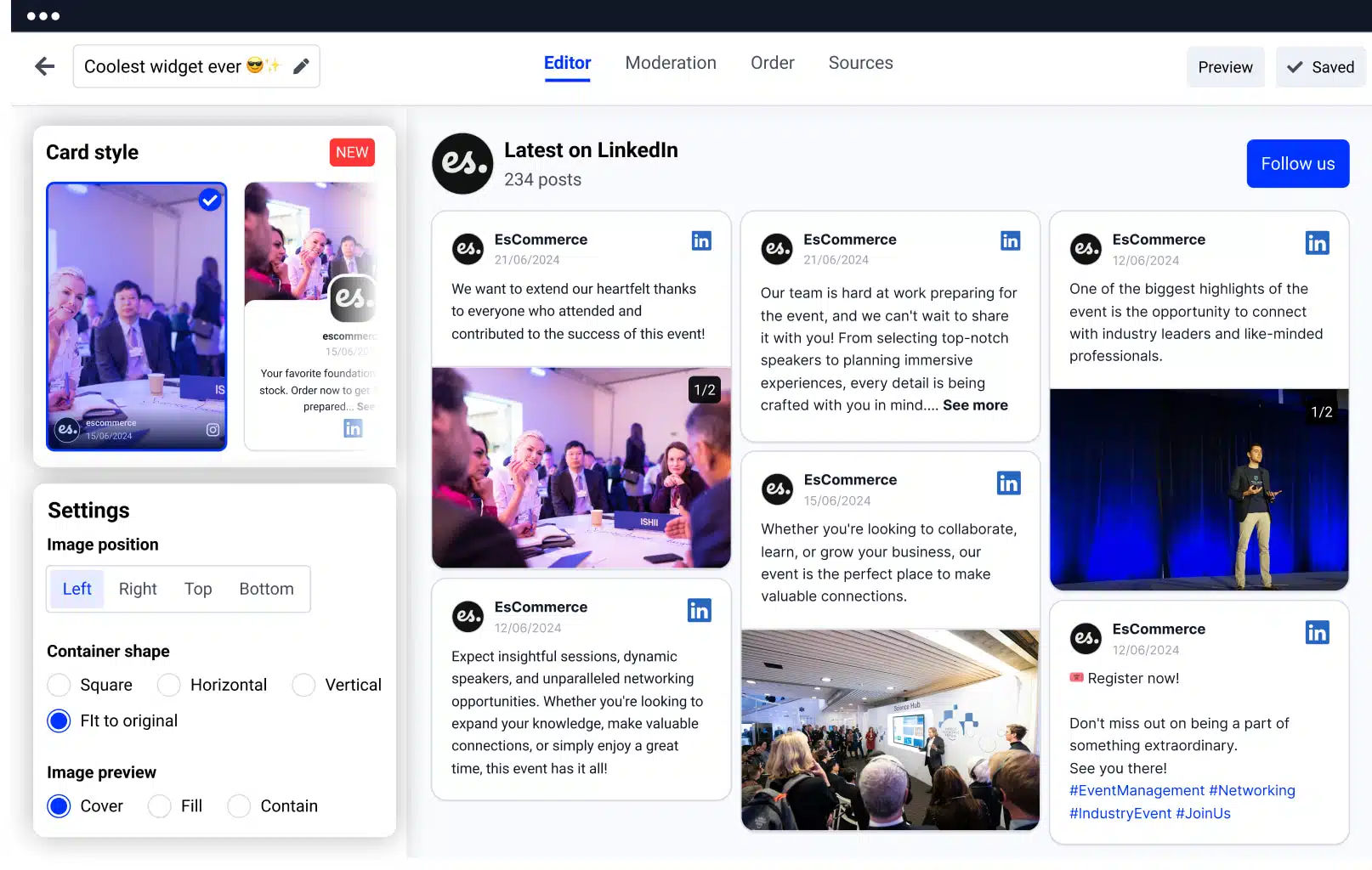
LinkedIn widget for websites
  • Mobile-responsive design , Looks great on phones, tablets, and desktops.

  • Post moderation and keyword filters , Curate what shows up on the feed.

  • Multiple layout options , Carousel, grid, masonry. pick what fits.

  • Lightbox view and “Load More” button , Keep visitors engaged longer.

  • Follow button integration , Convert visitors into LinkedIn followers.

  • Templates compatible with any WordPress theme , Drop in a clean look without custom design work.

  • Set the number of posts or columns , Tune the density to fit your layout.

  • Auto-sync with new LinkedIn posts , New posts show up automatically.

  • Google Analytics integration , Track widget engagement.

  • CTA buttons on posts , Drive clicks where they matter.

  • Custom CSS and color schemes , Match your brand exactly.

  • Lazy-loading and pagination options , Keep page speed snappy.

  • Multiple widgets , Run different feeds across pages or sites.

  • Combine with other social feeds , Instagram, Facebook, Twitter, and more.

Option 1: Using JavaScript code

Embedding a LinkedIn feed into your WordPress site is quick and straightforward. Choose between two methods. JavaScript code or the EmbedSocial WordPress LinkedIn plugin (shortcode).

  1. Step 1: Start your EmbedSocial free trial

    Start your EmbedSocial free trial.

  2. Step 2: Connect your LinkedIn page

    Select LinkedIn as your source and connect your company page.

  3. Step 3: Choose the type of feed

    Choose the type of feed (company updates, hashtag posts, employee content).

  4. Step 4: Customize the design

    Customize the design to match your site.

  5. Step 5: Open WordPress and pick a page

    Go to your WordPress admin panel and edit the desired page.

  6. Step 6: Add a Custom HTML block

    Add a “Custom HTML” block.

  7. Step 7: Paste the embed code

    Copy the embed code from the platform and paste it into the block.

  8. Step 8: Set and Update

    Click Set and then Update your page.

Option 2: Using the EmbedSocial WordPress plugin

  1. Step 1: Start your free trial

    Start your free trial.

  2. Step 2: Connect your LinkedIn page

    Connect your LinkedIn page.

  3. Step 3: Choose your preferred feed type

    Choose your preferred feed type.

  4. Step 4: Customize your widget

    Customize your widget.

  5. Step 5: Install the WordPress plugin

    In WordPress, go to Plugins > Add New, and install the EmbedSocial plugin.

  6. Step 6: Add a Shortcode block

    Edit your desired page and insert a Shortcode block.

  7. Step 7: Paste the shortcode

    Paste the generated shortcode from the platform.

  8. Step 8: Set and Update

    Click Set, then Update the page.

    Once embedded, your LinkedIn feed will display immediately. You’ll have full control to adjust layouts, moderate posts, and optimize performance.

Best practices for displaying a LinkedIn Feed

Effectively showcasing your LinkedIn feed on your website can increase brand trust, reinforce your social proof, and drive B2B engagement. Here’s how to make the most of it:

  • Prioritize high-impact placement , Embed the LinkedIn feed in high-visibility areas, such as your homepage, About Us page, or Careers section, where visitors are actively seeking brand credibility, culture insights, or real-time updates.

  • Use a clear value-focused headline , Guide attention with a headline that communicates the benefit of engaging with the feed. For example: “See what we’re sharing on LinkedIn” or “Real-time insights from our LinkedIn community.”

  • Highlight authentic, brand-relevant content , Feature updates that reflect your brand values, such as employee stories, client wins, product innovations, or thought leadership posts. This gives visitors a reason to follow your company and trust your expertise.

  • Optimize for visual impact , Use layouts like sliders, grids, or masonry to make your feed more dynamic. Prioritize posts with high-quality visuals, images, video clips, event recaps, to increase time on site and interaction.

  • Encourage follows with integrated CTAs , Add a subtle but clear follow button or CTA below the feed to convert visitors into LinkedIn followers and keep them engaged beyond the site visit.


Frequently asked questions

FAQs about the LinkedIn feed widget

Have a specific question about embedding the LinkedIn widget? Check the FAQ section below or chat with us.

How to embed LinkedIn feed on website?
To get started, sign up for a free trial and follow the steps below:
1. Connect your LinkedIn account and generate the posts from your LinkedIn company page.
2. Customize and moderate your feed.
3. Copy & paste the embed code into your website.

By following these steps, you will be able to embed LinkedIn company feed in just a few seconds.
Can I moderate the posts?
Yes, you can handpick which LinkedIn posts to show in your feed published on your website.

The moderation options are various, which means you can filter only posts published after specific dates or posts that include certain words.

Additionally, you can define tags and create multiple LinkedIn feeds containing different posts related to a specific category in your business.

By doing this you can showcase different feeds on different web pages.
Can I add multiple social media accounts?
In addition to the option to embed LinkedIn posts, you can use EmbedSocial to generate and add posts from other social media networks and create a big social media wall.

The system supports multiple social platforms to connect to the same account and generate and embed social media feeds.

Check our pricing plans and choose which plan suits the number of pages and accounts you have.
Can I make my LinkedIn feed shoppable?
Yes! The platform provides options to add custom 'Buy' buttons to each LinkedIn post that, when clicked, can navigate the web visitors to the checkout page where they can buy the selected product.

Additionally, you can easily embed LinkedIn feed with tagged links to your products' checkout pages.

This works with manually adding product information or an option to connect with Square and pull all your products' data.

This way, you will create an online store with products tagged on your latest LinkedIn posts.
Can it display all the new posts automatically?
Yes, you can automatically turn off or on to do social media aggregation.
Can I track interactions in the widget?
You can enable Google Analytics tracking of the feed by entering the Google Analytics ID shown in this example: UA-XXXXXX-YY.
Can I customize my LinkedIn widget?
Yes, you can use multiple templates or a custom CSS editor to make your social media feeds fit your brand and website design.

You can also enable localization options to ensure it fits your language.

EmbedSocial currently supports English, German and Japanese language. With this, you change the language of your feed.
Is EmbedSocial GDPR compliant?
Yes! EmbedSocial is GDPR-compliant and complies with each social media network policy from where you generate and curate content.
Is EmbedSocial compatible with web builders?
EmbedSocial integrates and works with all major content management platforms and website building platforms, such as WordPress, Squarespace website, PageCloud, Google Sites, Joomla, Wix, Weebly, Shopify website, Magento, Open Cart.

Embedding LinkedIn feeds in any website builder doesn't require any coding skills.

Every big website-building platform usually has a Custom HTML option where you only need to paste the provided code.

It works with all platforms that provide an option to embed third-party iframes or JavaScript codes.

Of course, the LinkedIn feed code also works within a simple HTML website.
Does the LinkedIn widget stop working if I cancel?
Yes, the embedded LinkedIn feed will stop showing on your website, and the LinkedIn page posts will stop to generate.

But you can come back and activate your account at any time.

Ready to embed a LinkedIn feed on WordPress?

Your LinkedIn updates already build credibility with B2B buyers. Now put them on your WordPress site so visitors see real, fresh thought leadership the moment they land.

$

29.00

month

Don't let your LinkedIn content live only on LinkedIn. Start displaying it on your WordPress site today to grow trust, drive engagement, and turn visitors into followers.

  • ✓ Embed live LinkedIn posts
  • ✓ Hashtag and company feeds
  • ✓ Carousel, grid, masonry layouts
  • ✓ Multi-source social walls
  • ✓ Custom CSS editor
  • ✓ Auto-sync new posts.

Official API integrations

EmbedSocial has official API integrations with all major social media networks.

Fast-loading widgets

We design interactive social media widgets that load fast on your website.

100% money-back guarantee

If it's not for you, get a full refund. No questions asked.

Dedicated support team

Just click the bottom left chat icon, and our team will assist you in real-time.

What our users are saying:

Nick Poggi
TrovaTrip increased booking conversion rates by 12% with customer testimonials in just 4 weeks

Nick Poggi

TrovaTrip

Ryan Hazlewood
The team at Embed Social is so easy to work with. They are very quick to respond to any special requests and fast to implement account changes. Aside from the great customer service, their products are also very easy to use and offer a lot of freedom that you can't get with other similar products. Definitely recommend.

Ryan Hazlewood

Developer

Zanna Ollove
EmbedSocial allows us to showcase social media content on our web pages in a way that's both functional and vibrant. Their library of social feed designs integrates seamlessly with our existing components and is easy to use for page editors of all skill levels.

Zanna Ollove

Boston College

Brooks Hitzfield
The experience with EmbedSocial has been amazing. We're always looking for ways to leverage our time, so finding a product to keep our reviews fresh automatically was a no-brainer.

Brooks Hitzfield

Seven Sons

