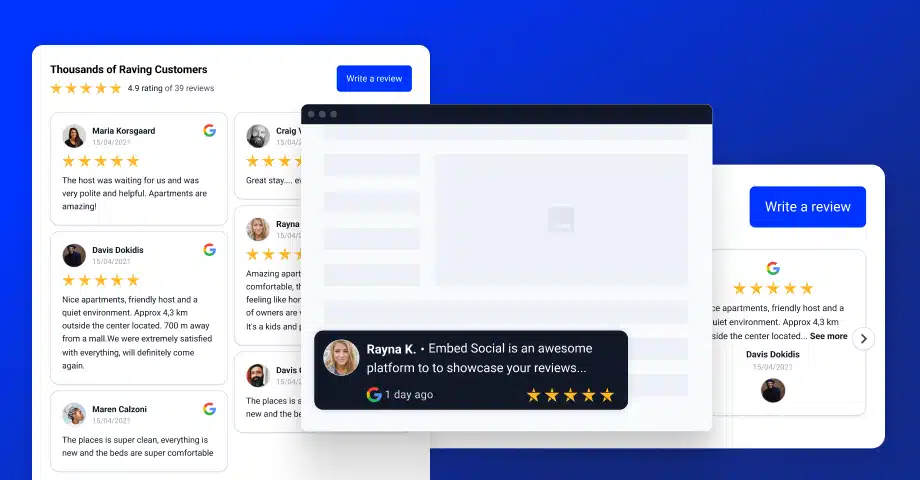

If you’re looking for the best Google reviews widgets to add social proof to your website in 2026, this guide will help you choose the right format. While a standard Google reviews widget is the foundation, the best-performing layouts today go far beyond a simple slider.
Some widgets work best as homepage trust sections, some belong in CTA blocks and hero areas, and others are better suited for badges, tabs, product pages, or full testimonial wall widgets. In other words, these are not just review boxes. They are complete website components for placing Google reviews exactly where they can have the biggest impact.
With EmbedSocial, you can choose from ready-made templates or use our AI widget builder to create a fully custom reviews section. Every option syncs directly with your Google Business Profile, so your website always shows fresh customer feedback automatically.
Below, you’ll find 19 of the best Google reviews widgets for websites, along with when to use each one, where to place it, and which business type it fits best.
Here is one running live, a Google reviews widget you can build from a free template in minutes:
What are the best Google reviews widgets for websites?
The best Google reviews widgets are the ones that match the goal of the page they live on. Some are designed to convert, some are better at showcasing lots of customer feedback, and some are built to fit a specific brand aesthetic or industry.
That’s why the best Google reviews widgets in 2026 are no longer limited to carousels or tiny badges. You can now build review-led hero sections, CTA blocks, testimonial feeds, “Wall of Love” pages, and even shoppable review experiences.
If your goal is simply to display reviews on a website, you can start with a classic slider. But if your goal is to improve conversions, reinforce trust on a service page, or design a stronger homepage section, a more specialized format will usually perform better.
A good example is a floating Google reviews badge: an always-visible trust signal that follows visitors as they scroll, shown here over a sample page.
How to choose the best Google reviews widget for your website
Before browsing templates, ask these three questions:
- What is the page trying to do? Build trust, drive clicks, support a CTA, or showcase lots of proof?
- How much space do you have? A badge or compact stack works differently from a full-width section or feed.
- How do visitors need to browse? Do they need a quick trust signal, a skim-friendly layout, or filters to explore specific feedback?
One quick note before we dive in: not every Google reviews widget should follow the same structure. Some work best as lightweight trust signals. Others deserve to be treated as full design sections. That’s why this list mixes sliders, walls, tabs, CTA sections, and more specialized layouts instead of pretending there’s only one “best” option for everyone.
19 best Google reviews widgets in 2026
Here are the best Google reviews widget examples to use on homepages, landing pages, local business sites, ecommerce stores, and service pages.
Best Google reviews widgets for conversions
1. Google Reviews Social Proof CTA Section
This is one of the best Google reviews widgets for landing pages because it combines social proof with a strong call-to-action in a single section. Instead of treating reviews like a separate block, it turns them into part of the pitch.
It works especially well for ecommerce brands, fashion stores, lifestyle products, and campaign pages where trust and conversion need to happen in the same visual space.
- Best for: landing pages, product campaigns, homepage conversion sections
- Where to place it: hero area, mid-page CTA block, promo pages
- Why it works: reviews actively support the click instead of sitting passively below the fold
2. Google Reviews HERO section
This Google Reviews HERO section is designed for brands that want to bring social proof above the fold. Instead of placing reviews lower on the page, it blends product imagery, messaging, CTAs, and Google review signals into one polished hero block.
It works especially well for ecommerce brands, fashion stores, beauty products, and premium lifestyle websites that want trust to support the first impression right away. The review rating, customer count, and visual proof help the hero feel more credible without taking attention away from the main offer.
Why choose this Google Reviews HERO section?
- Above-the-fold trust: Puts social proof directly inside your hero section.
- Built for conversions: Combines messaging, CTAs, and review signals in one layout.
- Clean visual balance: Blends product imagery with credibility elements naturally.
- Great for modern brands: Ideal for ecommerce, fashion, beauty, and lifestyle sites.
- Stronger first impression: Helps visitors trust the brand from the moment they land.
3. Shoppable Google Reviews Widget
This is one of the most advanced Google reviews widgets because it connects customer feedback with product discovery. Instead of simply showing what people said, it helps visitors shop the products mentioned in those reviews.
For brands investing in social proof and ecommerce conversion, this is one of the strongest options in the library.
- Best for: ecommerce stores, product pages, collection pages
- Where to place it: below product grids, in featured collections, on homepage sections
- Why it works: it shortens the gap between trust and purchase
Best Google reviews widgets for modern brand design
4. Google Reviews Card Stack Widget
This card stack layout is one of the best Google reviews widgets for minimal, modern websites. The layered cards give your reviews more visual depth, making them feel more designed and less like a generic testimonials feed.
- Best for: SaaS sites, agencies, modern business homepages
- Where to place it: trust sections, pricing pages, homepage mid-sections
- Why it works: compact format with strong visual polish
5. Google Reviews Widget for Agencies
This agency-style widget is built for brands that want their reviews to feel bold and intentional. The dark layout, oversized headline, and editorial styling make it a strong fit for creative, premium, and design-led websites.
- Best for: agencies, studios, consultants, premium service brands
- Where to place it: homepage feature section, about page, service overview
- Why it works: it elevates testimonials into part of the brand identity
6. Google Reviews Corporate Widget
This corporate-style widget pairs a bold quote card with a strong architectural image, making it feel closer to a premium brand section than a simple review slider. It’s ideal when presentation matters as much as proof.
- Best for: corporate brands, hospitality, real estate, premium services
- Where to place it: homepage feature section, about page, high-end landing pages
- Why it works: it combines visual storytelling with credibility
7. Google Testimonials Wall
If your website has a brighter, more expressive brand style, the rainbow widget is a fun alternative to standard review layouts. Each card uses a different color, which makes the whole section feel more dynamic and memorable.
- Best for: lifestyle brands, consumer products, playful homepages
- Where to place it: brand sections, homepage trust areas, campaign pages
- Why it works: strong visual personality without losing readability
Best Google reviews widgets for local and service businesses
8. Google Reviews Widget for HVAC businesses
This HVAC-focused layout is designed to build trust quickly. It combines a bold average rating display with review cards, which helps homeowners immediately understand your reputation before they call.
- Best for: HVAC, plumbing, electrical, repair, contractor businesses
- Where to place it: homepage, service pages, city/location landing pages
- Why it works: it supports high-trust local service decisions
9. Google Reviews Tabs (Free)
This tabs layout is one of the best Google reviews widgets for businesses that want visitors to browse feedback more intentionally. It organizes reviews into a neat structure, with reviewer names on the left and the selected review shown in a larger panel.
- Best for: restaurants, salons, SaaS brands, local businesses
- Where to place it: homepage trust section, service page, testimonial area
- Why it works: it helps visitors scan and choose which review to read
Best Google reviews widgets for showing lots of reviews
10. Classic Google Reviews Widget
This full-page feed format is one of the best Google reviews widgets for businesses with lots of customer feedback. It lets visitors scroll through many reviews in one place, which is ideal when volume itself is part of your credibility.
11. Wall of Love Widget
The Wall of Love is perfect when you want to create a dedicated destination for testimonials. It can include an average rating header, a leave-a-review prompt, and even filters for multiple sources, making it feel like a complete trust page instead of a simple widget.
- Best for: brands with high review volume and multiple sources
- Where to place it: dedicated testimonial page linked from navigation
- Why it works: it centralizes all your social proof in one place
12. Google Reviews Page
This Google Reviews Page is built as a full trust section, with your average rating, customer photos, review count, and review feed all in one place. It feels less like a widget and more like a dedicated reviews destination on your website.
It’s a strong fit for ecommerce brands, local businesses, and service companies that want to show review volume clearly and give visitors more proof before they buy or contact you.
Why choose this Google Reviews Page?
- All-in-one layout: Combines rating, photos, CTA, and review feed in one section.
- More review depth: Better for showcasing many reviews, not just a few highlights.
- Stronger trust signal: Makes your review count and average rating visible right away.
- Best for dedicated review pages: Ideal for trust pages, testimonial hubs, and branded review sections.
Best all-around Google reviews widgets
13. Single Google Reviews Slider
This format gives one review more breathing room, which makes it useful when your testimonials are longer or when you want one quote to feel more prominent. It’s a practical option for narrower layouts and focused trust blocks.
14. Dark Grid Google Reviews Widget
This dark grid template is a great fit for websites with a darker or more modern interface. It displays multiple reviews at once in a clean card layout, which makes it easier to scan more feedback without moving into a full feed.
15. Google Reviews Single-Slide Carousel
This single-slide carousel is a good fit when you want the feel of a slider but with larger, more readable review content. It works nicely as a “latest reviews” section on homepages and landing pages.
16. Minimal Google Reviews Slider
If you want the safest default choice for most websites, start here. The classic slider is compact, familiar, and flexible enough for homepages, service pages, sales pages, and general business websites.
17. Carousel Google Reviews Widget
The carousel adds a slightly more dynamic feel than a standard slider. It’s a strong all-around option for modern websites that want reviews to feel interactive without taking up too much space.
Best free and lightweight Google reviews widgets
18. Google Reviews Badges
Google review badges are perfect when you want a trust signal without dedicating a full section to reviews. They are small, flexible, and easy to place in high-visibility areas.
Dark badge: best for darker designs and premium footers.
Floating badge: best when you want the review signal to stay visible as users scroll.
Inline badge with customer avatars: best for blog posts, product pages, and content sections where a smaller social-proof touch works best.
19. Free Google Reviews Widget With a Lightbox
If you want to start with a free Google reviews widget, this is the most practical entry point. It lets you display your reviews in a simple format and open them in a lightbox for easier reading.
- Best for: small businesses, side projects, simple websites
- Where to place it: homepage trust section, footer, basic testimonials area
- Why it works: it’s quick to launch and easy to embed
Compare the best Google reviews widgets by use case
If you don’t want to go through all 19 designs one by one, here’s the fastest way to compare the best Google reviews widgets based on what you need them to do.
| Widget type | Best for | Where to use it | Main advantage |
|---|---|---|---|
| Social Proof CTA Section | Conversions | Hero, landing pages, promo sections | Reviews and CTA in one block |
| Card Stack Widget | Modern websites | Homepage trust sections, pricing pages | Compact and stylish |
| HVAC / Agency / niche layouts | Industry-specific pages | Service pages, local landing pages | Feels tailored to the audience |
| Classic Feed / Wall of Love | Large review libraries | Dedicated testimonials pages | Shows review depth |
| Slider / Carousel | General business use | Homepage, service pages, sales pages | Flexible and easy to place |
| Badges | Small trust signals | Header, footer, sticky corners | High trust in minimal space |
| Tabs | Interactive browsing | Restaurants, SaaS, local businesses | Easy to scan reviews |
| Keyword Filters | Decision-stage visitors | Comparison pages, service pages | Surfaces relevant feedback fast |
| Shoppable Widget | Ecommerce | Product pages, collections | Connects reviews to purchases |
| Corporate Widget | Premium brands | Homepage features, about pages | Strong visual storytelling |
Which Google reviews widget should you use?
There isn’t one universal winner, because the best Google reviews widget depends on the role the section needs to play on your page.
- Use the Social Proof CTA Section if your main goal is conversions.
- Use the Card Stack Widget if you want a modern, compact trust block.
- Use the HVAC or Agency layouts if your page should feel niche-specific.
- Use the Classic Feed or Wall of Love if you have lots of reviews and want to show depth.
- Use a Slider or Carousel if you want the safest all-around option.
- Use Badges if you just need a lightweight trust signal.
- Use Tabs if you want people to actively browse multiple reviews.
- Use the Keyword Filter Widget if visitors need to find feedback by topic.
- Use the Shoppable Widget if reviews should help sell products directly.
- Use the Corporate Widget if your testimonials need to look premium and design-led.
If we had to recommend one starting point for most businesses, we’d begin with a slider-style Google reviews widget because it’s flexible, easy to embed, and fits almost any site. But if you want the highest impact, go beyond the standard slider and choose a review section that matches the exact page goal.
How to embed the best Google reviews widget on your website
After choosing a template from the Google reviews widget library, the setup is very simple:
- Create your EmbedSocial account and activate the trial.
- Click Connect source to pull your Google reviews.
- Customize the widget in the editor.
- Copy the code and paste it into your website.

If you’re building a more advanced layout with our AI editor, you can also start by describing the widget you want and then refine it with prompts before embedding it.

Learn more:
Why use Google reviews widgets on your website?
Embedding Google reviews is one of the easiest ways to turn off-site trust into on-site trust. Instead of sending visitors away to check your reputation, you bring that credibility directly into the places where buying decisions happen.

- Better local SEO through stronger local SEO trust signals
- Higher credibility thanks to visible customer proof
- More confidence before contact or purchase on service and product pages
- Better customer insight into what people love and where they struggle
- More fresh feedback over time when reviews become part of your site experience
And because the widgets update automatically, they keep working in the background once you set them up.





![11 Best Social Media Widgets for Websites [+Top Use Cases]](https://embedsocial.com/wp-content/uploads/2023/03/Social-Media-Carousel-widget-template.webp)
![How to Embed Testimonials on Website in 2026 [2 Methods + Tips]](https://embedsocial.com/wp-content/uploads/2022/11/testimonials-dark-single-slider.jpg.webp)