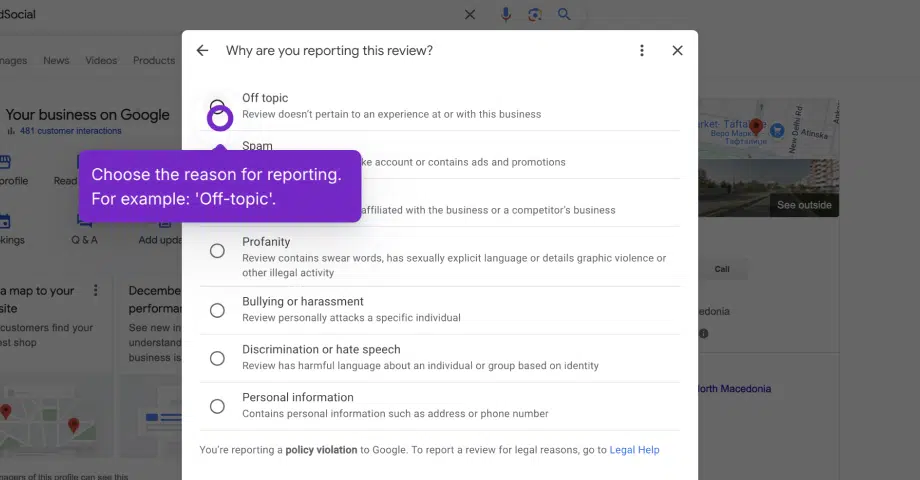

If you’ve received a fake review on your Google Business Profile, follow these steps to report it.
Before you start, go to Google Business Profile Manager, sign in with the Google account associated with your business, and follow these steps:
- Click the top menu item and navigate to the Google Business Profile Manager.
- In the shortcut options, click on ‘Read reviews.’
- Find the review you want to report in the popup and click the ‘Info icon.’
- In the options popup, choose the reason for the report, whether you think it is off-topic or a spam review.
- Google may take several days to review your report.
- Check your email or the ‘Reviews’ section of your Google Business Profile for updates.
Tips for success:
- Familiarize yourself with Google’s review policies.
- If the review is not removed, consider legal action as a last resort or consult a lawyer.
By taking these steps, you can ensure your profile remains a trustworthy resource for your customers. For more ways to strengthen your listing, learn how to optimize your Google Business Profile.





![How to Manage Multiple Google Business Profiles [+Best Tools]](https://embedsocial.com/wp-content/uploads/2025/10/manage-multiple-google-business-profiles.jpg.webp)
